
DEX RELEASE: ENHANCED TRANSACTION FILTERS AND FUNDING GRID UPDATES

NEW FEATURE / IMPROVEMENTS: 

This release introduces improvements to the Transactions and Funding modules in Dex. These updates enhance filtering capabilities, improve reporting clarity, and provide additional functionality for healthcare merchants.

FEATURE OVERVIEW:

  • Timestamp Filter: Added a new timestamp filter in the Transactions module to filter records by both date and time.
  • Method Filter: Relocated the Method filter to improve visibility and ease of access.
  • Funding Labels: Updated labeling in the Funding module for clearer reporting.
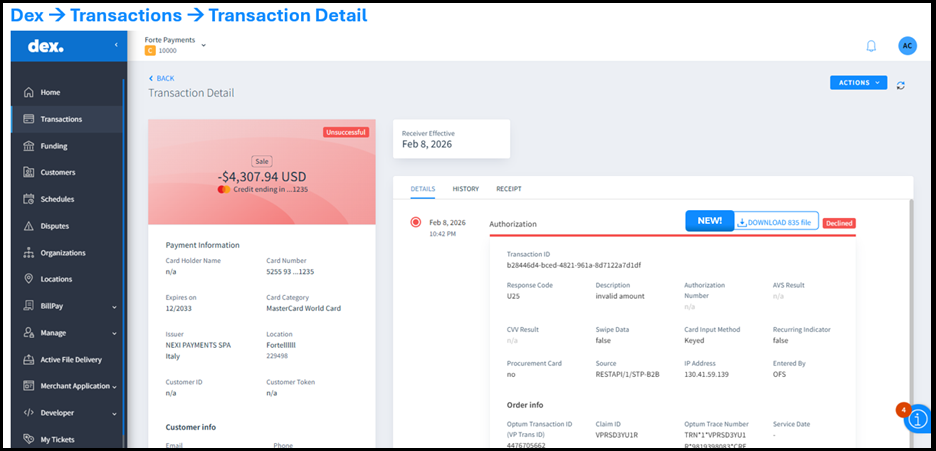
  • Straight Thru Processing: Enabled direct 835 file downloads in Dex for eligible Healthcare merchants enrolled in Straight Thru Processing.

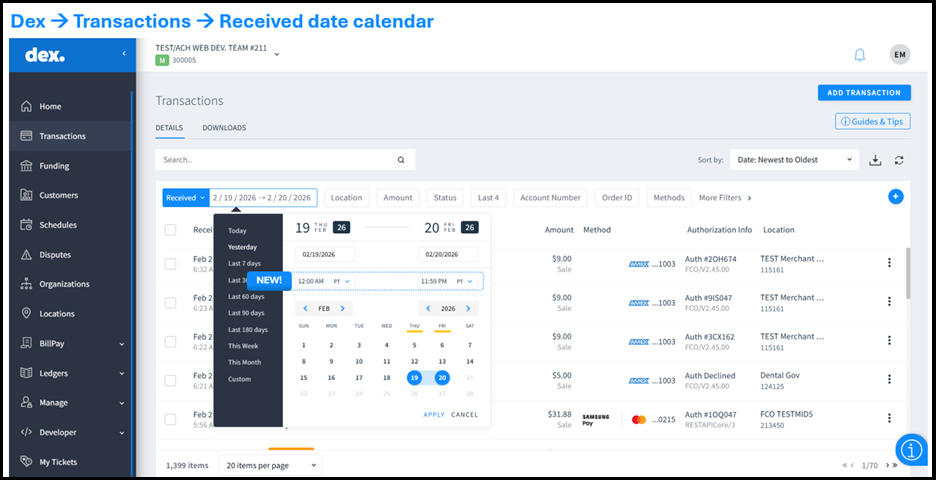
Timestamp Filter in the Transaction Module

A new time-based filter is now available within the calendar widget in the Transactions module.

You can:

  • Filter transactions by both date and time
  • Set a custom cutoff time
  • Align results with your local time zone, instead of being limited to Pacific Standard Time (PST)

Benefits:

  • Enhances reconciliation accuracy by allowing transaction data to reflect precise timing based on your selected cutoff.
  • Ensures closer alignment with internal reporting processes, reducing discrepancies between system data and business records.
  • Provides greater control when reviewing transaction activity, enabling more precise and flexible analysis.

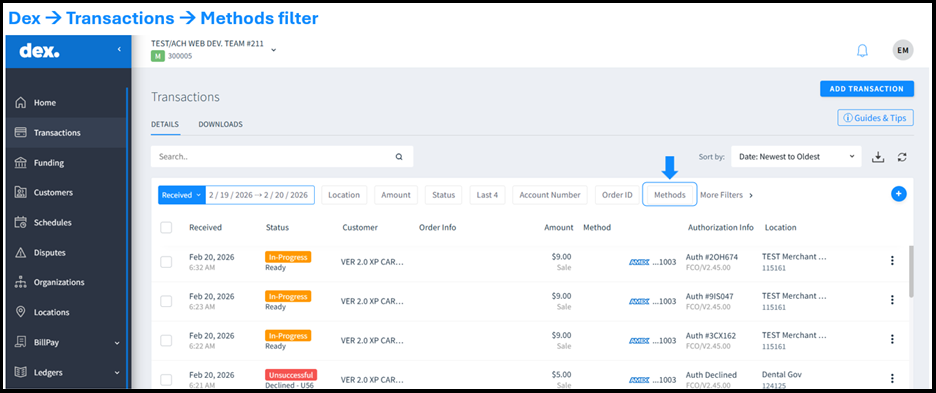
Method Filter Now Always Visible

The Method filter has been moved to the main Transactions menu and is now always visible within the transaction grid.

Benefits:

  • Enables quicker access to filtering controls, allowing you to refine transaction views without searching through menus.
  • Reduces unnecessary steps when applying filters, helping you locate relevant transactions more efficiently.
  • Delivers a more intuitive and streamlined user experience, improving overall navigation within the Transactions module.

Funding Grid Label Update

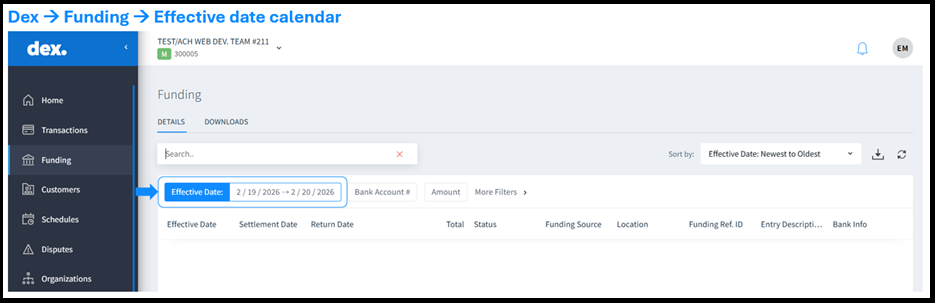
In the Funding module, the label “Received Date” has been updated to “Effective Date.”

This change:

  • Clarifies when funds are expected to be reflected in your bank account
  • Improves reconciliation accuracy
  • Aligns filter terminology with grid results
  • Enhances reporting consistency

Straight Thru Processing Enahcements for Healthcare Merchants

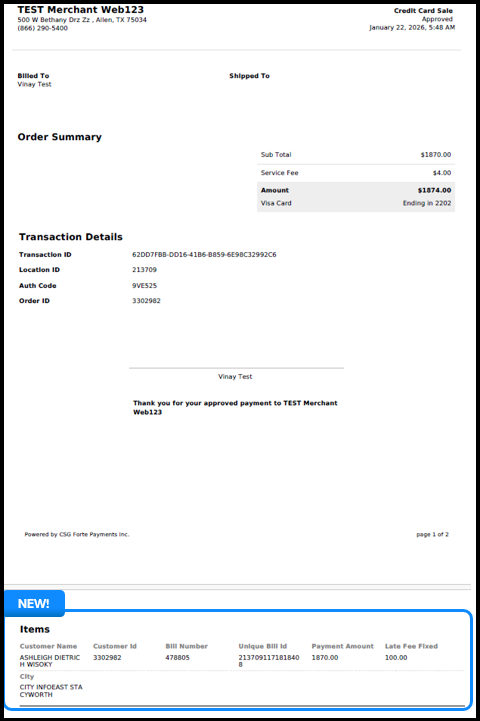
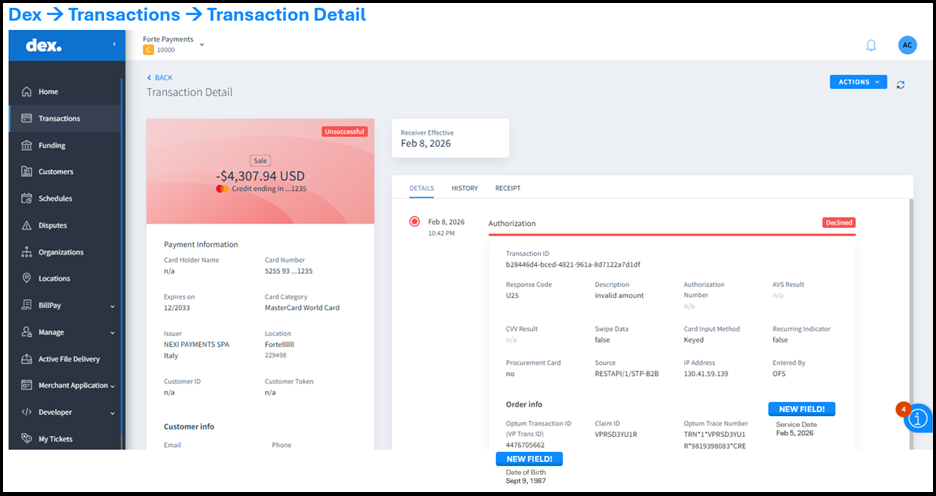
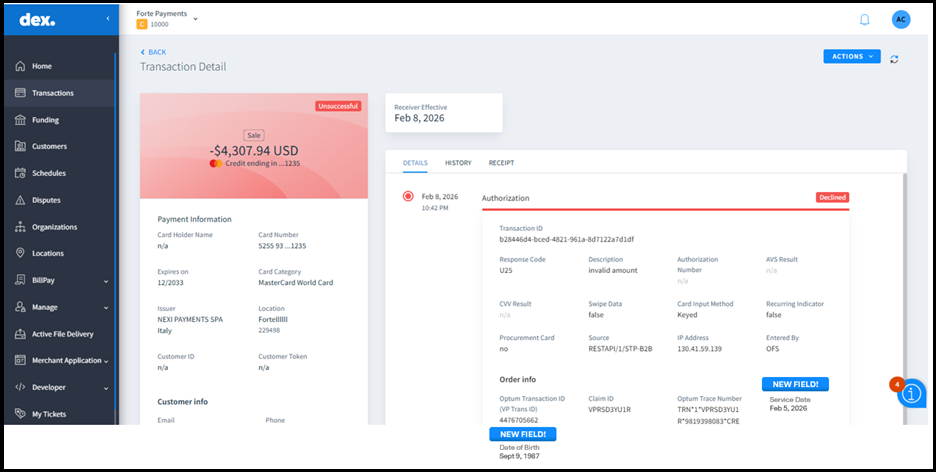
Healthcare merchants enrolled in Optum’s Straight Thru Processing can now download 835 files directly from Dex.

  • Additional patient data is available in the transaction grid and details page
  • Access to 835 file downloads is restricted to eligible roles (Merchant Admins) to maintain security

Benefits:

  • Minimizes manual processing, eliminating the need for external retrieval steps.
  • Provides greater transparency into healthcare payment activity.
  • Streamlines reconciliation and reporting workflows by centralizing payment records and supporting faster, more accurate financial matching.

BILLPAY ENHANCEMENTS: INTRODUCING SCHEDULE PAYMENTS ON GUEST MODE

NEW FEATURE / IMPROVEMENTS: 

This release introduces Schedule Pay for Guest users and enhancements to the checkout experience. These updates provide greater payment flexibility for payers and improved visibility for merchants.

FEATURE OVERVIEW:

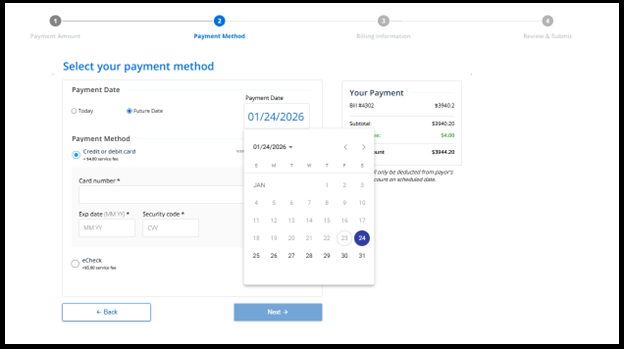
  • Scheduled Payments in Guest Mode: Enables guest users to schedule full-balance payments for a future date without creating an account.
  • Enhanced Checkout Experience: Introduces a simplified, more intuitive checkout flow with improved navigation and consistent UI.
  • Benefits: Highlights key advantages for both payors and merchants, including flexibility, visibility, and improved payment success rates.

SCHEDULE PAY FOR GUEST USERS

Flexible Payment Scheduling in Guest Mode

  • Guest users can now schedule payments for a future date instead of paying immediately, without creating an account.
    • No account registration is required
    • Payments can be scheduled on or before the bill due date
    • Only the full balance is eligible for scheduling
    • Past-due bills are not eligible for scheduling in Guest mode

This feature supports first-time and occasional payers by offering greater flexibility while helping merchants anticipate upcoming payments.

Enhanced Checkout Experience 

  • The checkout flow has been updated to deliver a faster, clearer, and more consistent payment journey.
    • Simplified and more intuitive layout
    • Improved navigation across payment steps
    • Consistent UI across all payment journeys
    • Streamlined overall payment process

Benefits 

  • Payor:
    • Schedule payments for a convenient future date
    • Complete payments without creating an account
    • Experience a cleaner, easier checkout flow
    • Navigate payment steps with improved clarity
    • Avoid immediate payment pressure while staying within due date
  • Merchants:
    • Increase payment flexibility for guest users
    • Improve likelihood of successful guest payments
    • Gain visibility into upcoming scheduled payments
    • Support revenue forecasting with better payment insights
    • Reduce support inquiries through a simplified checkout experience
    • Deliver a modern and consistent payment experience that enhances brand perception

BILLPAY PORTAL UPDATES: FASTER PAYMENTS, SIMPLER EXPERIENCE

NEW FEATURE / IMPROVEMENTS: 

We are excited to introduce new features and improvements that make the BillPay portal faster, easier, and more intuitive. These updates streamline the payment process, reduce steps, and improve the overall user experience.

FEATURE OVERVIEW:

  • Smarter, faster payments: Guest and registered users can now complete payments more quickly with auto-populated billing information.
  • One-click checkout: If only one bill is found, it is automatically added to the cart, eliminating extra steps.
  • Guest Pay enhancements: A redesigned search results page provides instant confirmation messages and a clear count of bills in the cart.

Smart Auto-Populate for Checkout

The checkout process now includes an auto-populated feature to help customers pay faster. The system now intelligently pre-fills their billing information.

  • Guest users: The system automatically fills in name, address, and postal code based on bill details.
  • Registered users: The system also auto-fills email and phone number from the user’s portal profile.
  • Intelligent logic: The system manages multiple bills and minor variations (such as capitalization) seamlessly. Users can edit information at any time.

Single-Bill Auto-Add to Cart

When a payer searches for a bill and only one standard bill is found, the system now automatically adds it to the cart. This eliminates extra clicks and speeds up checkout.

Note: This feature applies only to single, standard bills. It does not apply to multiple bills, grouped bills, PDF views, or cases that require specific payment calculations.

The bill search results page has been redesigned for better clarity and efficiency.

  • Cart bill count: Displays a real-time count of bills in the cart.
  • Instant confirmation: Provides clear messages when bills are added or removed.
  • Improved navigation: The Modify Search button is now Search more bills, making it clearer that users can add multiple bills to a single checkout.

Dex Release: Improvements to Reporting, Receipts, and Notifications

New Feature / Improvements: 

This release introduces enhancements across Dex, Webtools, Notifications, and PayPal integrations, focusing on transaction visibility, reporting accuracy, compliance readiness, and overall system reliability.

FEATURE OVERVIEW:

Invoice Visibility and Document Access

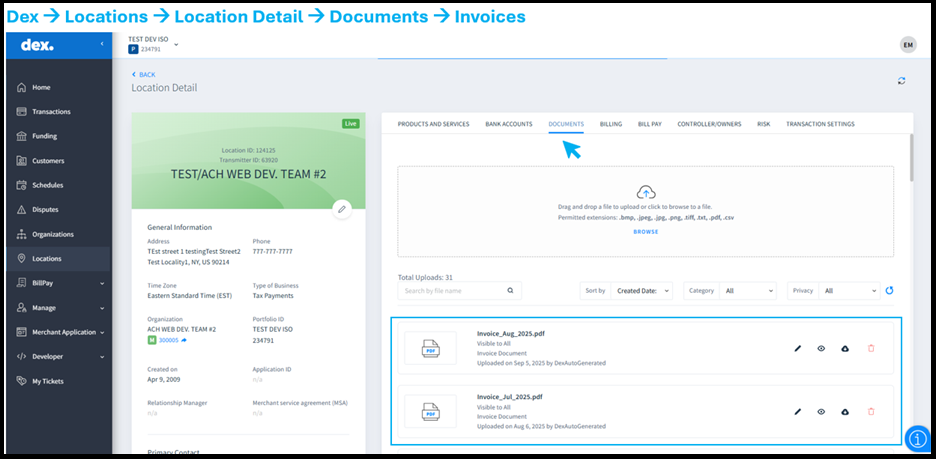
Merchant invoices, whether uploaded manually or through automated monthly processes, are now fully accessible to all authorized partners.

  • Partners no longer need to adjust privacy settings repeatedly to view invoices.
  • Invoices can be viewed directly within Dex or downloaded as needed.

This update improves operational efficiency, reduces administrative overhead, and ensures partners have reliable, consistent access to all invoice documents.

Funding and Reporting Clarity

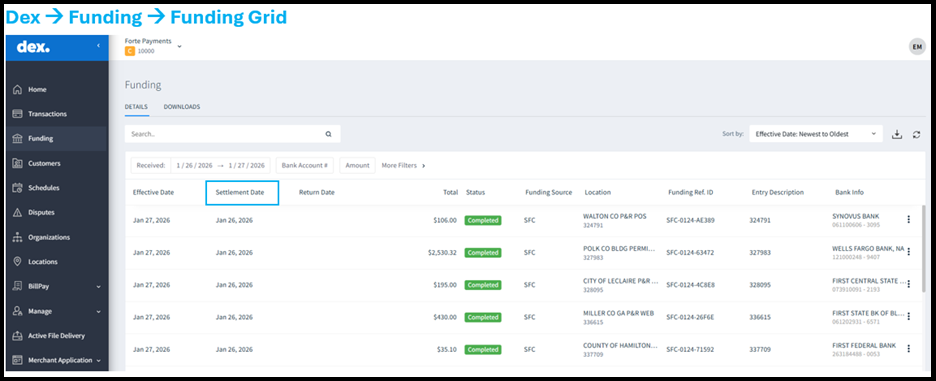
The Dex Funding grid and exported funding reports have been updated to improve clarity and accuracy:

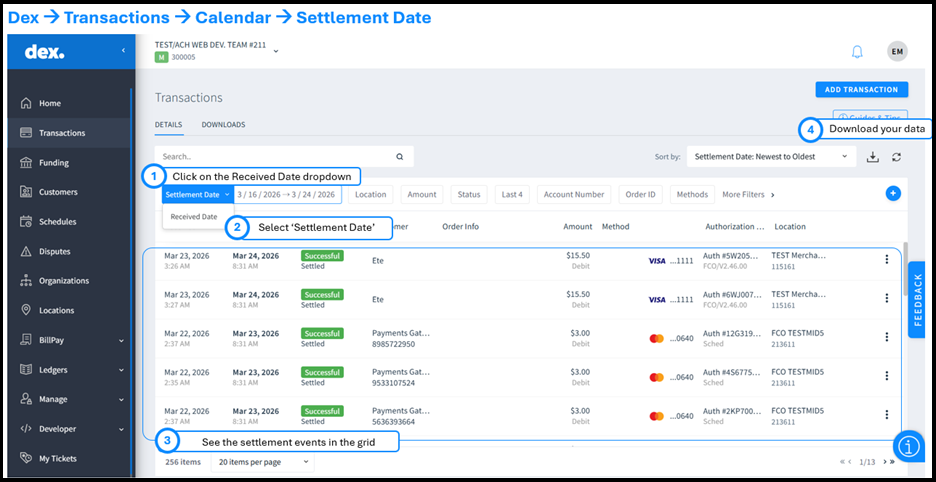
  • Label updates: The field previously labeled “Origination Date” is now “Settlement Date”, providing clearer context for funding transactions.
  • Payout reconciliation accuracy: Discount fee values now match consistently between the Dex interface and reconciliation downloads, resolving previous reporting discrepancies.
  • Enhanced visibility: Funding details are easier to interpret, allowing partners to track and reconcile transactions with confidence.

Notifications and Email Reliability

The notification system has been enhanced for consistent delivery and improved reliability:

  • Notification emails are sent through a standardized email service.
  • Multiple recipients (To, CC, BCC) separated by semicolons are now fully supported in notification templates.

Receipt Messaging and Compliance

Receipt footer messages are now centrally managed and update automatically:

  • Messages adjust dynamically based on transaction type and merchant state.
  • Changes are immediately reflected in Dex → Transactions → Transaction Details → Receipt.

This ensures all receipts display accurate, state-specific compliance language without requiring system changes.

Expanded PayPal Reporting

Enhancements improve visibility and operational flexibility for PayPal transactions:

  • PayPal is now selectable as a payment method in the Active File Delivery (AFD) report.
  • Selecting “ALL” payment methods now includes PayPal alongside other processors.
  • Eligible PayPal authorization transactions can now be reversed once settled and complete.

Account Updater Enhancements: Expanded Support for Gateway Merchants

New Feature/Improvements:

This release expands Account Updater (AU) to support Gateway Merchants.

Previously, Account Updater was available only to  Acquired Credit Card Merchants. With this enhancement, Gateway Merchants who process card transactions through other Payment processors can  enroll in Account Updater while continuing to work with their existing processor.

Gateway Merchants can now benefit from automated card updates, helping reduce payment failures caused by outdated, expired, or replaced card information.

FEATURE OVERVIEW:

  • Expanded Merchant Eligibility: Merchants processing payments through any processor on the Global Gateway can now enroll in Account Updater.
  • Card Network Coverage: Account Updater supports card networks such as, Visa, Mastercard, and Discover across the globe (except India).
  • Automated Processing: Account Updater run automatically, including weekends and holidays.

BENEFIT TO MERCHANTS:

  • Broader access to Account Updater services for Gateway Merchants
  • Fewer payment declines due to outdated card details
  • No changes required to existing integrations

DEX UPDATES: NSF RECOVERY REPORTING – ENHANCED VISIBILITY FOR MERCHANTS

New Feature/Improvements:

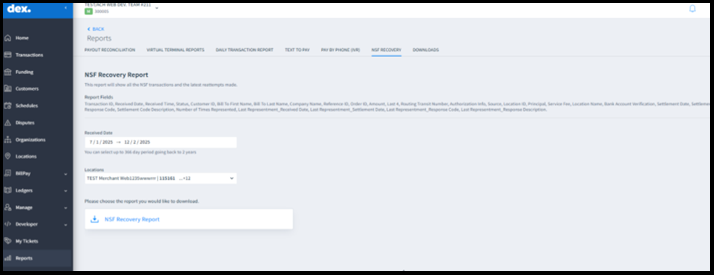
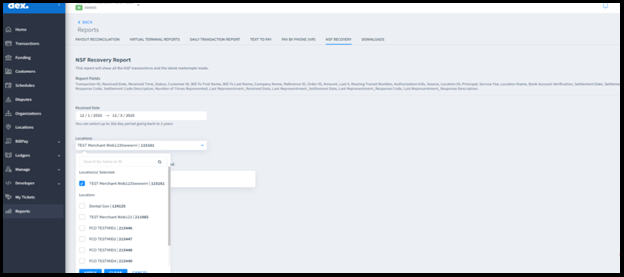
This release introduces a dedicated NSF Recovery Report in the Dex portal, providing users with clearer visibility into NSF (Non-Sufficient Funds) transactions and recovery attempts.

 Note: This feature is available only to merchants who are enabled for NSF Recovery services.

FEATURE OVERVIEW:

  • New NSF Recovery tab in the Reports section
  • Downloadable Excel report with detailed NSF transaction insights
  • Improved data accuracy for representment tracking and reconciliation

NSF Recovery Report

Users can now view all NSF transactions and the latest representment activity in a single, consolidated report.

Benefits to Users

  • Faster access to accurate NSF reattempt data
  • Reduced manual investigation and reporting effort
  • Better visibility into recovery outcomes and operational impact

Key Capabilities:

  • Track NSF transactions, reattempts, and recovery outcomes
  • Filter results by:
    • Date Range, select up to 366 days within a 2-year lookback
    • Location(s), choose one or multiple merchant locations
  • Export complete results in an Excel file

 Note: The selected date range applies to the original transaction date.

 Report Fields Include:

  •  Transaction details (ID, dates, amounts)
  • Customer and billing information
  • Bank routing + last 4 of account number
  • Settlement details and response codes
  • Representment history:
    • Number of Times Represented
    • Last Representment Received Date
    • Last Representment Settlement Date
    • Response Code & Description

This enhancement empowers merchants with clearer insights, streamlined reporting, and greater control over NSF recovery operations.

BillPay Enhancements: Introducing Login with OTP and UI Improvements

New Feature/Improvements:

This release brings significant enhancements to the login experience, including the introduction of One-Time Passcode (OTP) login and several interface improvements aimed at providing a more seamless user experience.

FEATURE OVERVIEW:

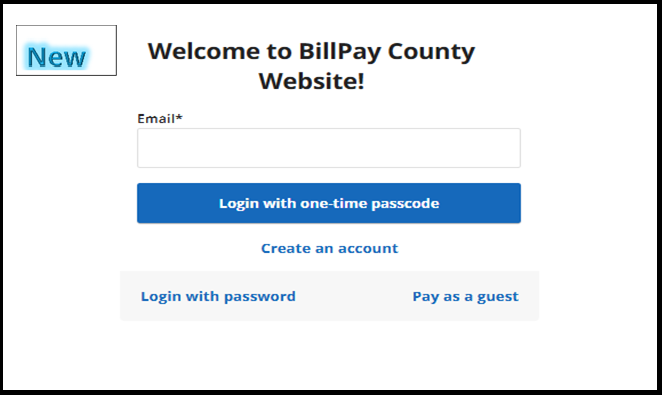
One-Time Passcode Login

  • This simplified login option provides a secure, password-free way to access your account.
  • The OTP is sent to the user’s registered email address, making it a quick and reliable authentication method.

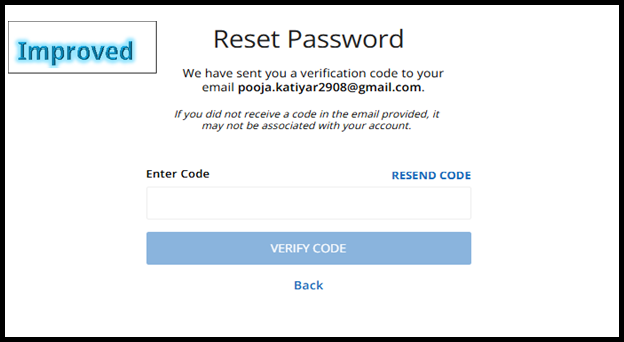
Reset Password Screen Improvements

  • Buttons have been repositioned for improved user experience.
  • Instructions have been updated for better clarity, making it easier for users to reset their password without confusion.

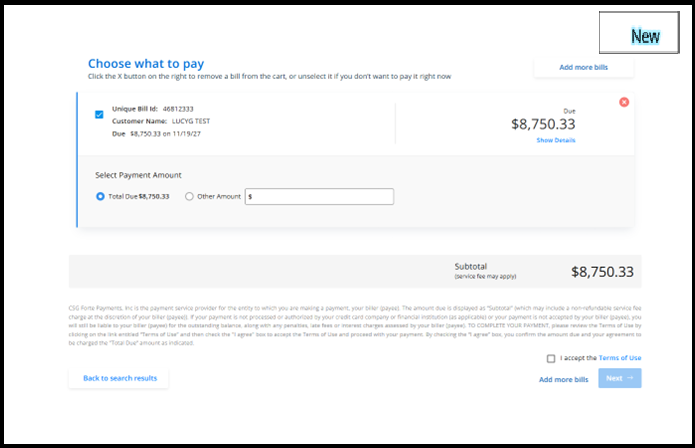
“Add More Bills” Button

  • The new button, located on the cart page, allows guest users to easily return to the Bill Search screen and add additional bills.
  • This enhancement streamlines navigation and simplifies the bill addition process.

Dex Release: Enhancements to Transactions, Reporting, Receipts, and Notifications

New Feature / Improvements:

This release introduces functional and user interface improvements in transaction reversals, reporting, bulk customer import, receipt printing, and payment notifications.

FEATURE OVERVIEW:

Enhance Reverse Transaction

  • Improved interface with clearer warnings for credit vs. debit reverse transactions.
  • For merchants using the Service Fee model:
    • Service fee can be reversed independently of the transaction amount.
    • A confirmation dialog appears when reversing with a service fee to reduce errors.

Reporting Enhancements

Merchant-defined fields (xData 5–9) are now included in:

  • Dex Auto Daily Report
  • Export Transaction Report from Dex (displayed as Data Label 5–9, by default).

Receipt & Printing Improvements

  • One-page printing (CTRL+P): All transaction details and line items now print on a single page while using the browser.
  • Consistent formatting:
    • Correct account types (Savings vs. Checking) are displayed in eCheck receipts.
    • Updated capitalization for readability in receipts (for example, “eCheck sale” instead of “ECHECK SALE”).
    • Receipts now display the correct time zone.

Mass Import Customer

  • Dex now supports importing customers and payment methods in bulk.
  • Only merchant administrators and Forte employees can perform this action.

Payment Notifications

  • Force eCheck transactions are now fully included in payment status notifications.
  • Upcoming schedule notifications now include the Schedule Created event details in the email notifications.

IMPROVED DIRECT RECOVERY REPORTS WITH NSF FEE INSIGHTS

NEW FEATURE / IMPROVEMENTS:

We are pleased to announce an update to Direct Recovery reporting that provides greater visibility into Non-Sufficient Funds (NSF) fee collection.

NEW FIELD ADDED TO FUNDED ITEM AND RECEIVED ITEMS DETAILS REPORTS

If you use the Direct Recovery (DR) Portal, you will now see new columns in both the Funded Item Details Report and the Received Items Details Report. These updates give you clearer insight into NSF fee activity.

Funded Item Details Report:

  • “Fee Coll?” Column: This new column clearly indicates whether the NSF fee was successfully collected for a transaction.
    • A “Y” will appear if the fee was collected.
    • The field will remain blank for unsuccessful collection attempts.
  • “Fee amount” Column: This column clearly shows the dollar amount of the NSF fee collected. This field is blank if no fee was collected.

Received Items Details Report:

  • “Fee amount” Column: This column shows the dollar amount of the NSF fee collected for each transaction.
    • This field is blank if no fee was collected.

Note: These updates are available to all Direct Recovery merchants. They apply only to the detailed reports. Summary reports are not affected.

BILLPAY PORTAL UPDATES: FASTER PAYMENTS, SIMPLER EXPERIENCE

NEW FEATURE / IMPROVEMENTS: 

We are excited to introduce new features and improvements that make the BillPay portal faster, easier, and more intuitive. These updates streamline the payment process, reduce steps, and improve the overall user experience.

FEATURE OVERVIEW:

  • Smarter, faster payments: Guest and registered users can now complete payments more quickly with auto-populated billing information.
  • One-click checkout: If only one bill is found, it is automatically added to the cart, eliminating extra steps.
  • Guest Pay enhancements: A redesigned search results page provides instant confirmation messages and a clear count of bills in the cart.

Smart Auto-Populate for Checkout

The checkout process now includes an auto-populated feature to help customers pay faster. The system now intelligently pre-fills their billing information.

  • Guest users: The system automatically fills in name, address, and postal code based on bill details.
  • Registered users: The system also auto-fills email and phone number from the user’s portal profile.
  • Intelligent logic: The system manages multiple bills and minor variations (such as capitalization) seamlessly. Users can edit information at any time.

Single-Bill Auto-Add to Cart

When a payer searches for a bill and only one standard bill is found, the system now automatically adds it to the cart. This eliminates extra clicks and speeds up checkout.

Note: This feature applies only to single, standard bills. It does not apply to multiple bills, grouped bills, PDF views, or cases that require specific payment calculations.

The bill search results page has been redesigned for better clarity and efficiency.

  • Cart bill count: Displays a real-time count of bills in the cart.
  • Instant confirmation: Provides clear messages when bills are added or removed.
  • Improved navigation: The Modify Search button is now Search more bills, making it clearer that users can add multiple bills to a single checkout.