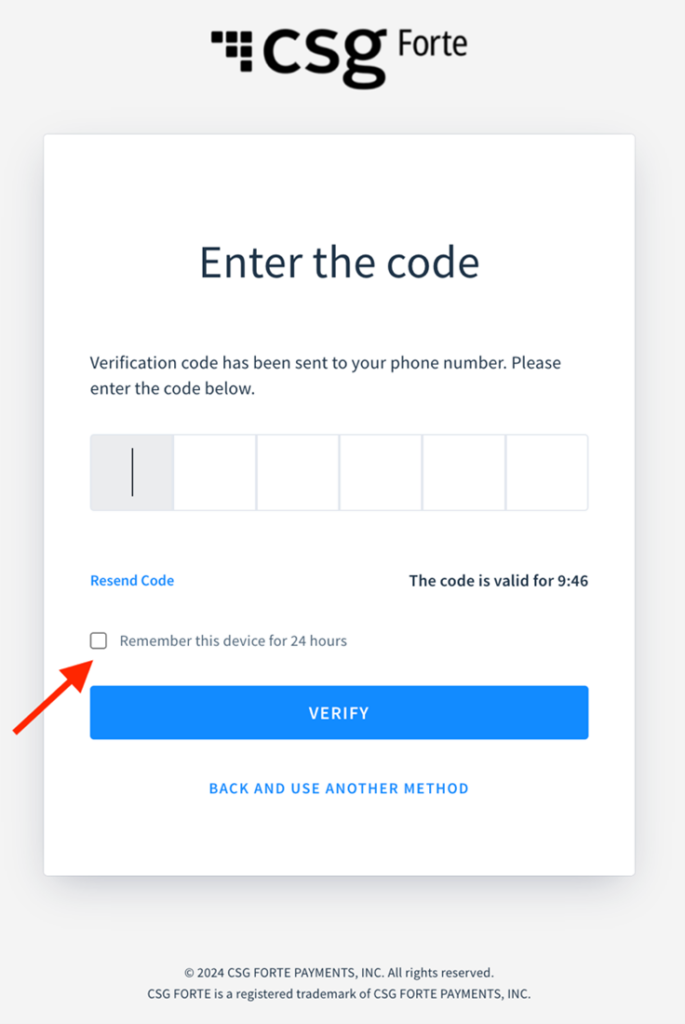

We are excited to announce a new feature, ‘Remember this device’ during the dex Login. Users who have opt-in to multi-factor authentication now have an option to select ‘Remember this device’ after their initial successful code validation. If the user selects ‘Remember this device’ option, they will not be prompted to verify the code during login for the next 24 hours. If the user logs in to a different device and/or change their location of login or the browser from which they login, they will be prompted to verify the secondary code for security reasons.
ENHANCED BILLPAY PORTAL HOME PAGE
Posted on
New Feature / Improvements:
A refreshed BillPay Portal Home Page is now available for you and your customers.
NEW FEATURE / IMPROVEMENTS:
*IMPROVEMENT* BILLPAY PORTAL home page is modernized
The revamped BillPay Portal Home Page offers a seamless and user-friendly experience across desktop and mobile platforms, ensuring a satisfying journey for all users.
What is changing?
Main calls to action are highlighted: We are rearranging the content to call out main calls to action. So, your customers can clearly see the steps they need to take on the Payment Portal, which simplifies the process, increasing payment success.
Look and feel is now updated: We’re keeping key elements, enhancing accessibility, modernizing the page, and including major improvements for mobile devices (fewer steps and clear interphase), which aids in improving the overall user experience. Please note that most Home Page elements follow your current Portal’s setup.
Portal features are customized based on your choices: This means the new Home Page changes based on your Portal Mode.
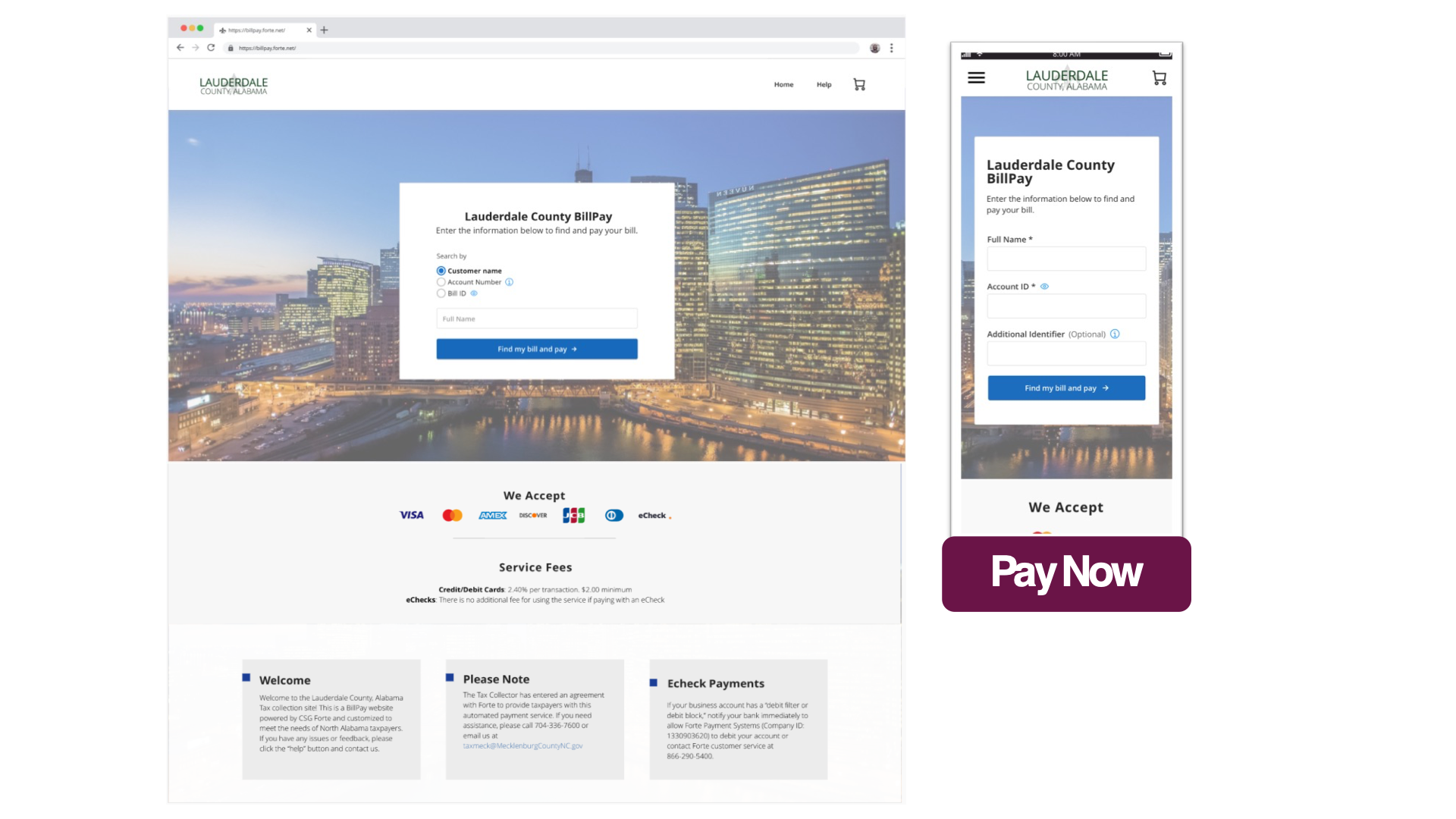
So, if you support Pay Now only, search fields are now embedded on the Home Page. Hence, your customers can promptly search for their bills and pay them easily.
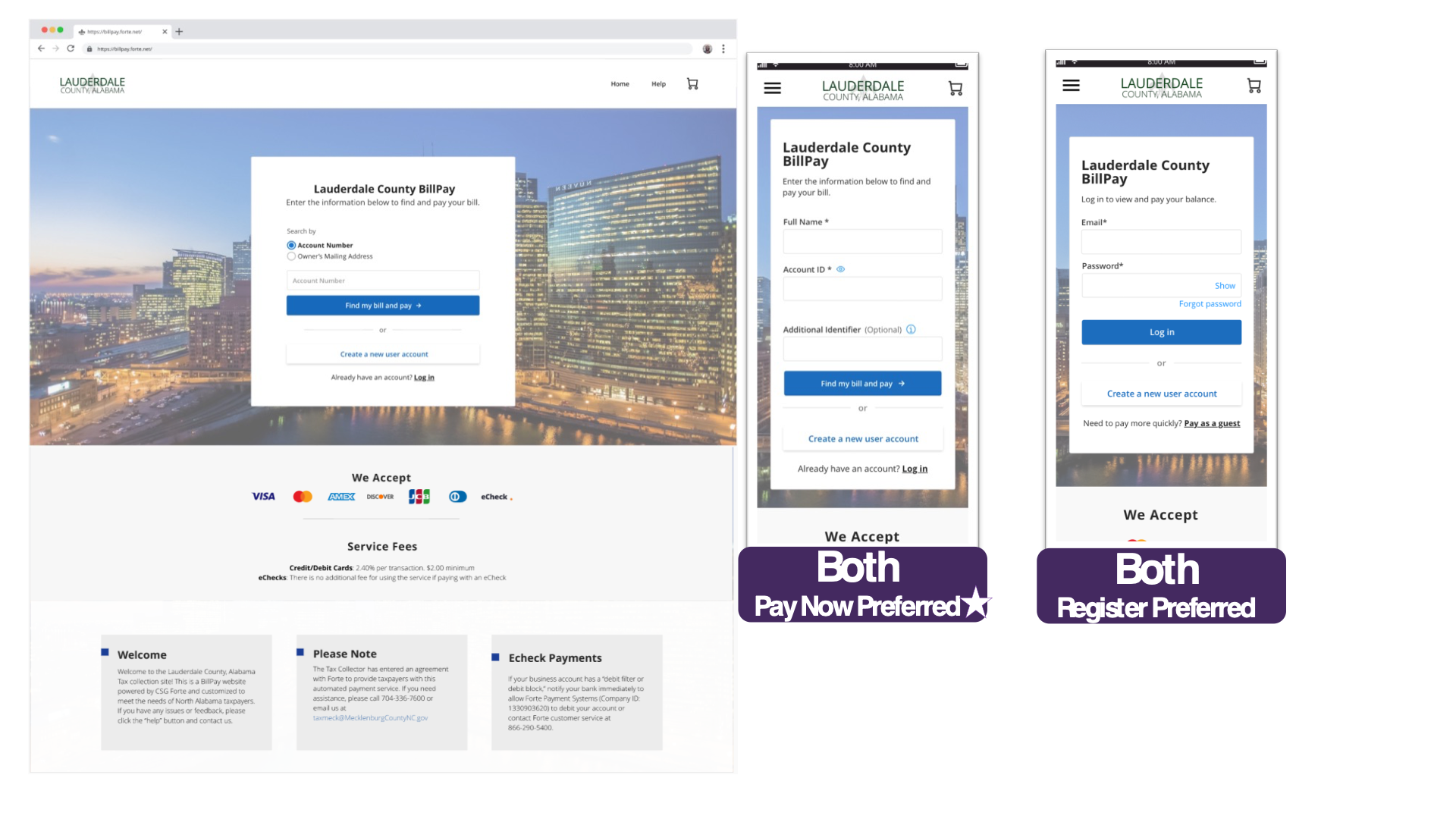
And if you are supporting both options, you can choose to highlight either Pay Now or Login. In this case, the search fields are now embedded on the Home Page by default. To highlight the login instead or any other request, reach out to your main Forte contact or Add a ticket to our web page using this link and include the request as ‘BillPay Portal Home Page’.
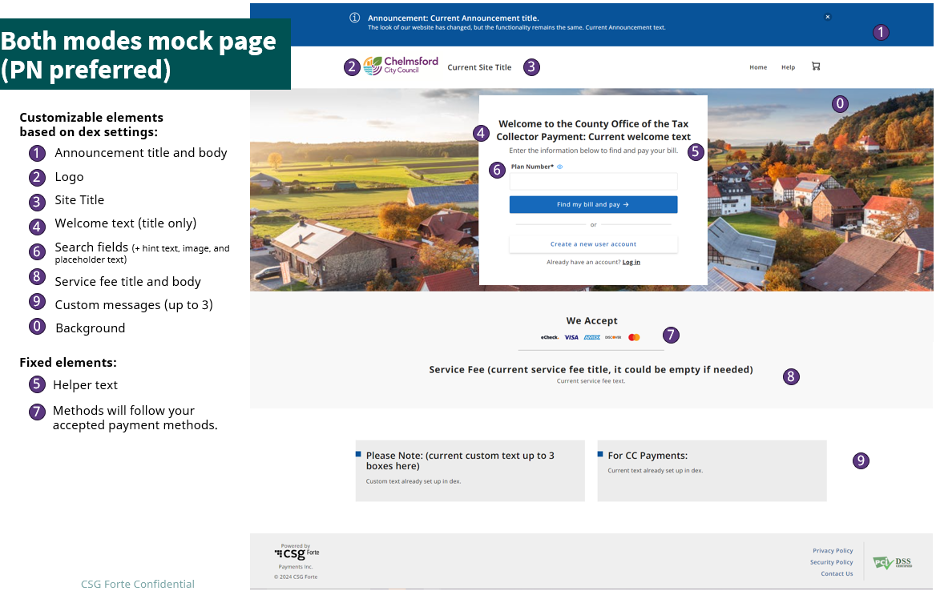
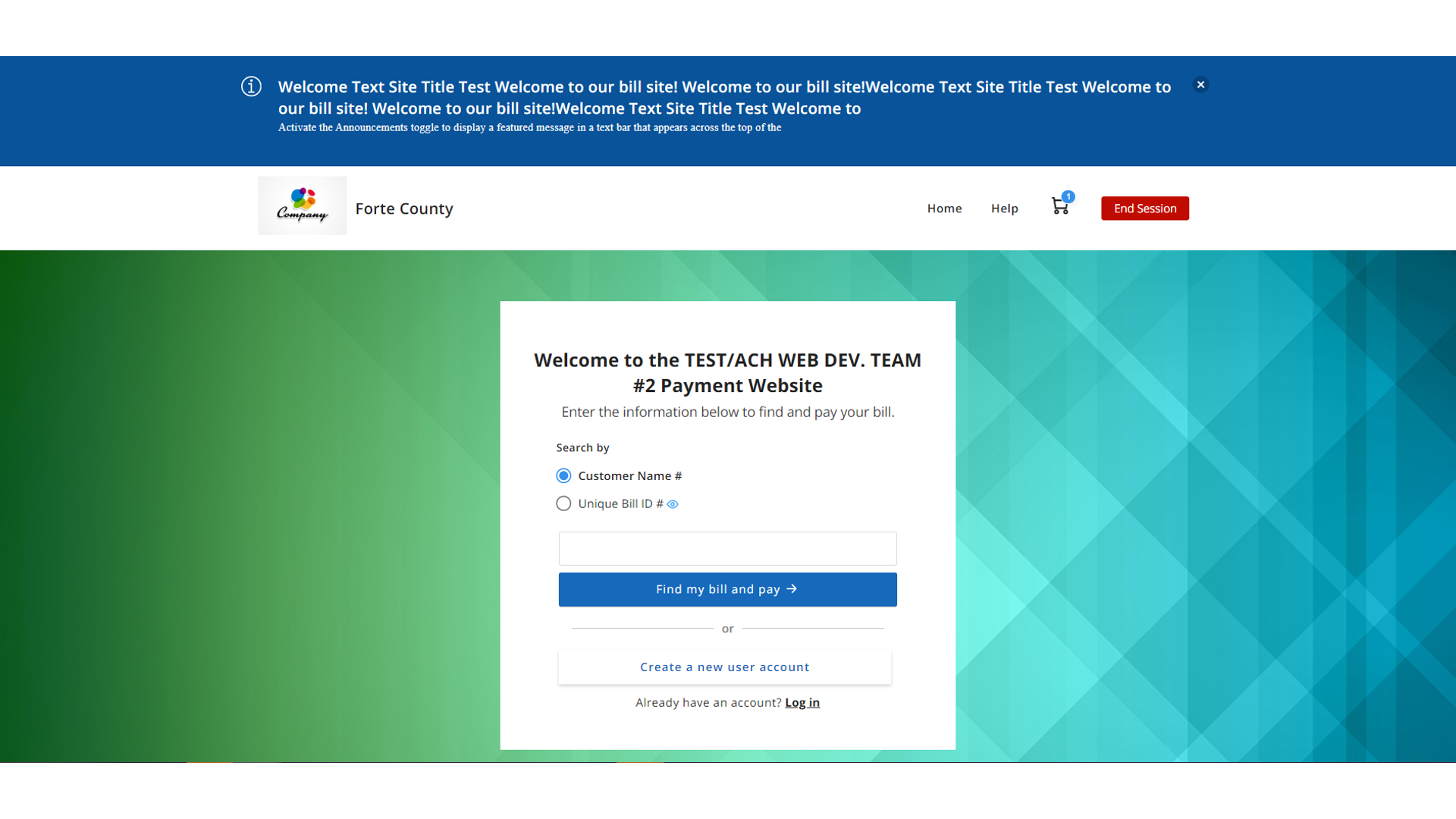
Enhanced Home Page screens:
Mode: Pay Now only
Mode: Both (Pay Now + Register)
If you allow both modes (Pay Now and Register), PayNow is the default option.
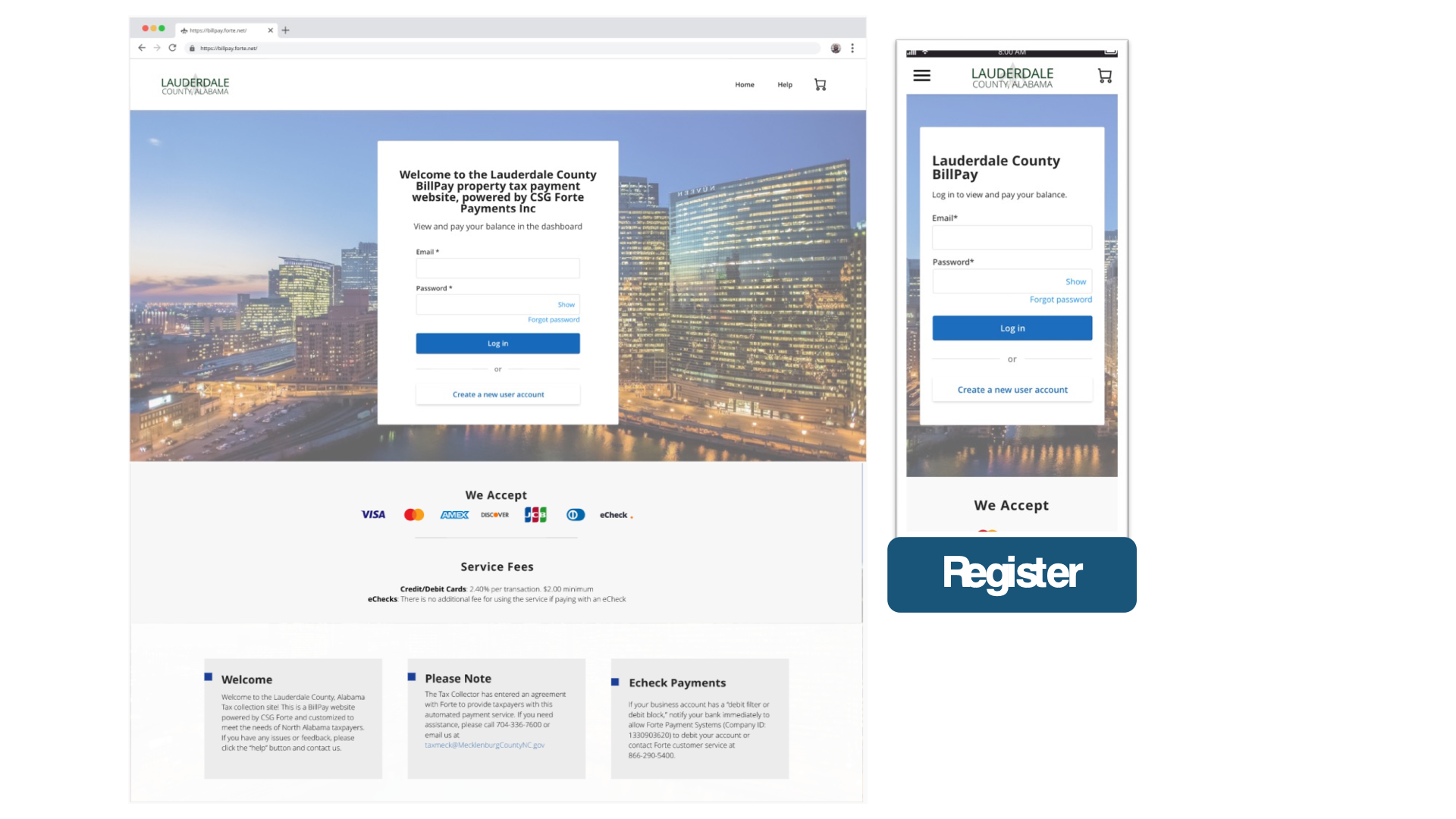
Mode: Register only
Detailed list of Home Page elements:
Please note that most Home Page elements follow your current Portal configuration.
Kiosk mode
VALIDATE PLUS NEW SETTINGS
Posted on
New Feature / Improvements:
Verification Services | Validate Plus new settings have been included in dex, so you will have more flexibility in approving or declining transactions based on verification outcomes.
NEW FEATURE / IMPROVEMENTS:
*NEW FEATURE* new validate plus settings available in dex
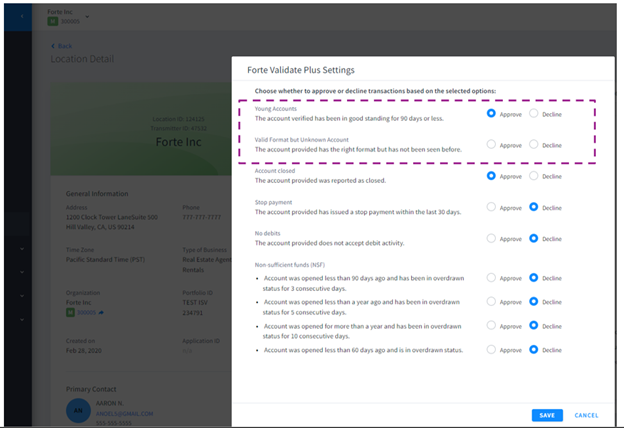
If you are enrolled in the Validate Plus service, you will be able to approve or decline transactions based on the following two new additional settings:
Young accounts: You can approve or decline transactions linked to accounts that have been seen in 90 days or less.
Valid format but unknown account: You will be able to approve or decline transactions related to accounts that have an appropriate format but haven’t been seen before in Validate Plus databases.
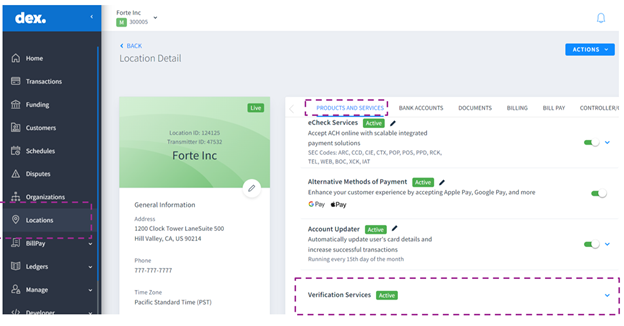
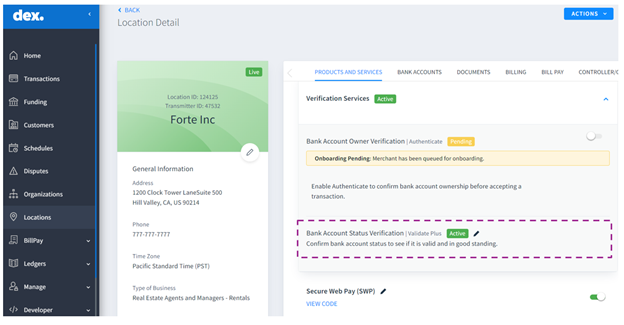
The default value is going to be “Approve”, so if you’re interested in declining those transactions, you should log in to dex > go to locations > Products and Services > Verification Services > and edit the Bank Status Verification | Validate Plus settings by clicking on the pencil icon.
You can also reach out to your main Forte contact to change these or other Validate settings, or you can create a ticket on our web page using this link and include a request as ‘Validate Plus request”.
A member of the CSG Forte team will promptly assist you with your request and notify you.
Validate Plus updated screens:
Verification services in locations tab
Validate Plus
New Validate Plus settings that you can change based on your approval/declining preferences Note: You will see all the settings or some of those based on your eligibility.
REPORT AND TRANSACTIONS ENHANCEMENTS IN DEX
Posted on
MERCHANT SERVICES – DEX
New Feature / Improvements: · Payout Reconciliation Detailed Report
· Transactions area improvements
· Payment Status Notifications Enhancement
· Transaction, Funding, Schedules, and Dispute areas in Dex now allow data searching spanning up to 2 years.
New Feature / Improvements:
Payout Reconciliation Detailed Report
We are excited to announce the launch of our new Payout Detailed Reconciliation Report, designed to streamline and enhance merchants’ reconciliation process.
Key Features:
· Multiple Locations: Merchants can now include multiple locations in a single report, making it easier to manage and consolidate data.
· Customizable Formats: Choose the preferred download format for the payout report—XLSX or CSV—based on the merchant’s specific needs.
· Transaction Details: The report now includes comprehensive transaction information, featuring over 30 fields encompassing transaction, funding, customer, and order data. This extensive detail allows merchants to effortlessly match report data with bank statements or other records.
We are pleased to introduce the latest enhancements to our transactions area, designed to improve your experience and efficiency.
Key Enhancements:
Enhanced Order ID Filter: We’ve improved the Order ID filter in the transaction datagrid to enable an exact match, making it easier and faster to find specific transactions.
Receipt – Line Items Enhancement: We identified and fixed an issue where line items were duplicated on Dex’s transaction receipt tab. This problem has now been fully resolved, ensuring an accurate and consistent display of transaction details. Users will no longer see duplicated line items on their transaction receipts, leading to clearer transaction records.
Payment Status Notification Enhancement
The “Schedule Processing Date” is now available in the Upcoming Schedule Notification. This update ensures more accurate and relevant scheduling information in your notifications, enhancing the overall experience.
Transaction, Funding, Schedules, and Dispute updates
Transaction, Funding, Schedules, and Dispute areas in Dex now allow data searching spanning up to 2 years. To enhance performance and loading speed, Dex allows searching for transactions up to 2 years old within these grids. For accessing data beyond this period, please submit a request via the Freshdesk platform.
DIRECT RECOVERY PORTAL PASSWORD UPDATES
Posted on
New Feature / Improvements:
Direct Recovery Portal’s new password policy has been implemented to further enhance security and avoid data leaks.
NEW FEATURE / IMPROVEMENTS:
*New feature* NEW PASSWORD POLICY IMPLEMENTED IN THE DIRECT RECOVERY PORTAL
If you are a Direct Recovery Portal user, starting now, the minimum password length will be increased to 14 characters. This means that the next time you update your Direct Recovery password or someone’s password or create a new password for someone, the password will need to meet these new requirements:
The password must have:
At least 14 characters
At least one number
At least one uppercase and one lowercase letter
At least one symbol
Must be different from the user’s login name.
Cannot contain three consecutive, identical characters.
You must choose a new password different from the last 5 passwords you’ve used.
In addition, your password will expire every 90 days.
This change is part of our ongoing commitment to safeguarding your information and ensuring the highest level of security for our users.
Thank you for your cooperation in keeping your account secure.
Increase in Account Testing, BIN and Enumeration Attacks
Posted on
The payments industry continues to see an increase in the number of card testing attacks globally. Worldpay advises you and your sub merchants to be diligent, increase awareness and review current detection controls to help prevent these types of fraudulent attacks.
An improved registration flow is now available for your customers in the BillPay Portal.
NEW FEATURE / IMPROVEMENTS:
*IMPROVEMENT* BILLPAY PORTAL REGISTRATION Gets a New Look
We are enhancing the user experience to help your customers with an easier registration process for a new user account.
A mobile-friendly experience.
A cleaner look and feel.
Same functionality.
. Enhanced Registration Process Screens:
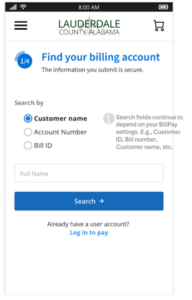
Search for billing account(s)if you follow the search with optional fields only:
or if you ask for required fields:
Select billing account(s)
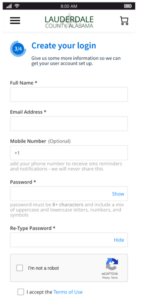
Create a user account:
Verify email:
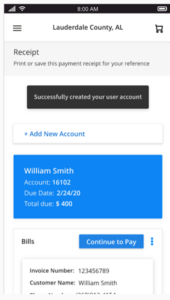
Land on the BillPay portal dashboard:
BillPay account balance notification
Posted on
New Feature / Improvements:
A new email notification is available for your customers to subscribe to in the BillPay Portal.
Let us look into this new feature in detail in the following section.
NEW FEATURE / IMPROVEMENTS:
*NEW* account balance email notification
Registered customers can opt-in to receive email notifications whenever there is an update to their account balance, helping them to stay informed about any changes in their bill amount. This notification is received when an update is made to the account balance.
No default selection is made for the notification, so the user has the option to opt-in to any notification they want to receive.
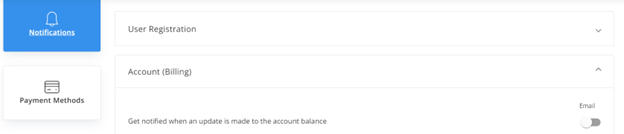
How to enable it? Registered users should log in to their account, go to Settings > Notifications > Account (Billing)
They should turn on the toggle for “Get notified when an update is made to the account balance”.
New notification screenshot:
TRANSACTIONS AND LOCATION DOCUMENTS ENHANCEMENTS IN DEX
Posted on
MERCHANT SERVICES
New Feature / Improvements:
• Add Transaction Flow in Dex
• Custom Fields in Transactions in Dex
• Location Documents Improvements in Dex
New Feature / Improvements:
Add Transaction Flow
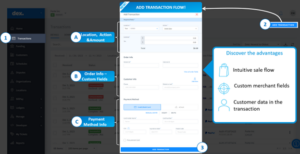
Experience the enhanced and seamless process of adding transactions through Dex! Our upgraded interface offers a more intuitive and user-friendly sales experience. Simply follow these steps:
• Navigate to Dex.
• Click “Transactions.”
• Select “Add Transaction”
• Fill out the required data.
• Add your transaction.
With these simple steps, you can effortlessly enjoy a more streamlined and user-friendly way to add new payments. Enhance your transaction process today!
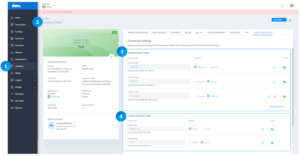
We’ve introduced the ability to include up to 8 custom fields when creating transactions in Dex. These fields empower you to incorporate specific business data, facilitating seamless reconciliation, comprehensive reporting, and in-depth analysis.
To customize your transaction fields, follow these steps:
• Navigate to Dex.
• Click on “Locations.”
• Choose “Location Detail.”
• Access “Transaction Settings.”
Now, you’re all set to tailor your transaction fields to suit your business needs. Elevate your data management with personalized insights—explore the possibilities in Dex today!
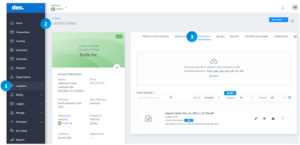
The Location Documents section has been upgraded with a brand-new categorization system. Now, effortlessly organize, filter, and manage your merchant documents with ease.
To explore this feature, follow these simple steps:
• Navigate to “Locations”
• Click on “Location Detail”
• Select “Documents”
This enhancement is designed to empower you with a more intuitive and efficient document management experience. Thank you for choosing our platform, and we hope this update further enhances your workflow.
DEX REPORTS ENHANCEMENTS
Posted on
MERCHANT SERVICES
New Feature / Improvements:
*NEW* Virtual Terminal Reports in Dex
*NEW* Auto Daily Reports in Dex
*NEW* Text to Pay Report
Enhancements
Transaction Download New Field: Routing Transit Number
Payment Status Notification: Enhancement to Locations displayed
New Feature / Improvements:
*NEW* Virtual Terminal Reports in Dex
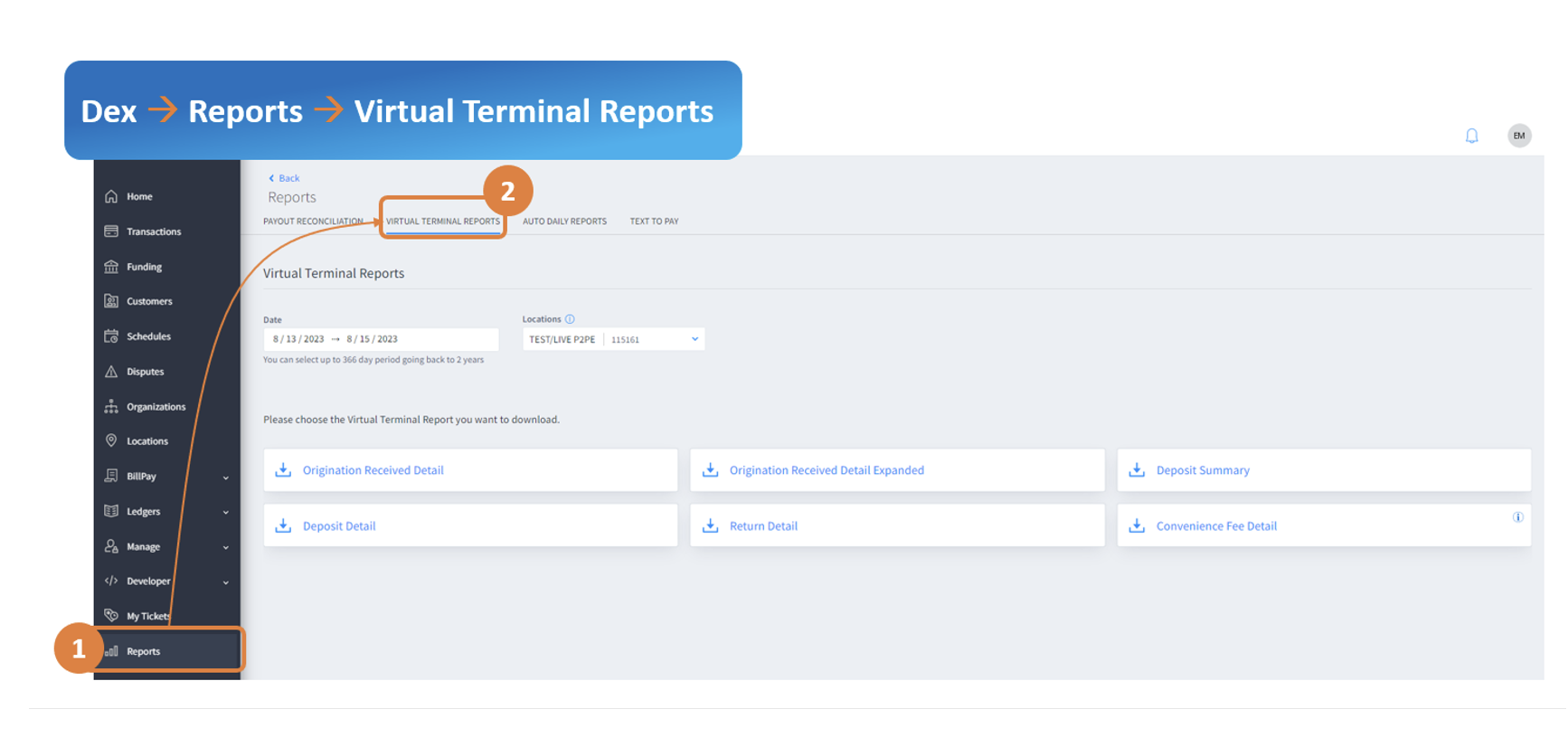
Want to download the Virtual Legacy Reports from Dex? Now, you can easily find them in dex under Reports –> Virtual Terminal Reports tab.
Below are the reports that you will find in this new area in Dex:
Deposit detail
Received detail
Received detail expanded
Convenience Fee detail
Deposit summary
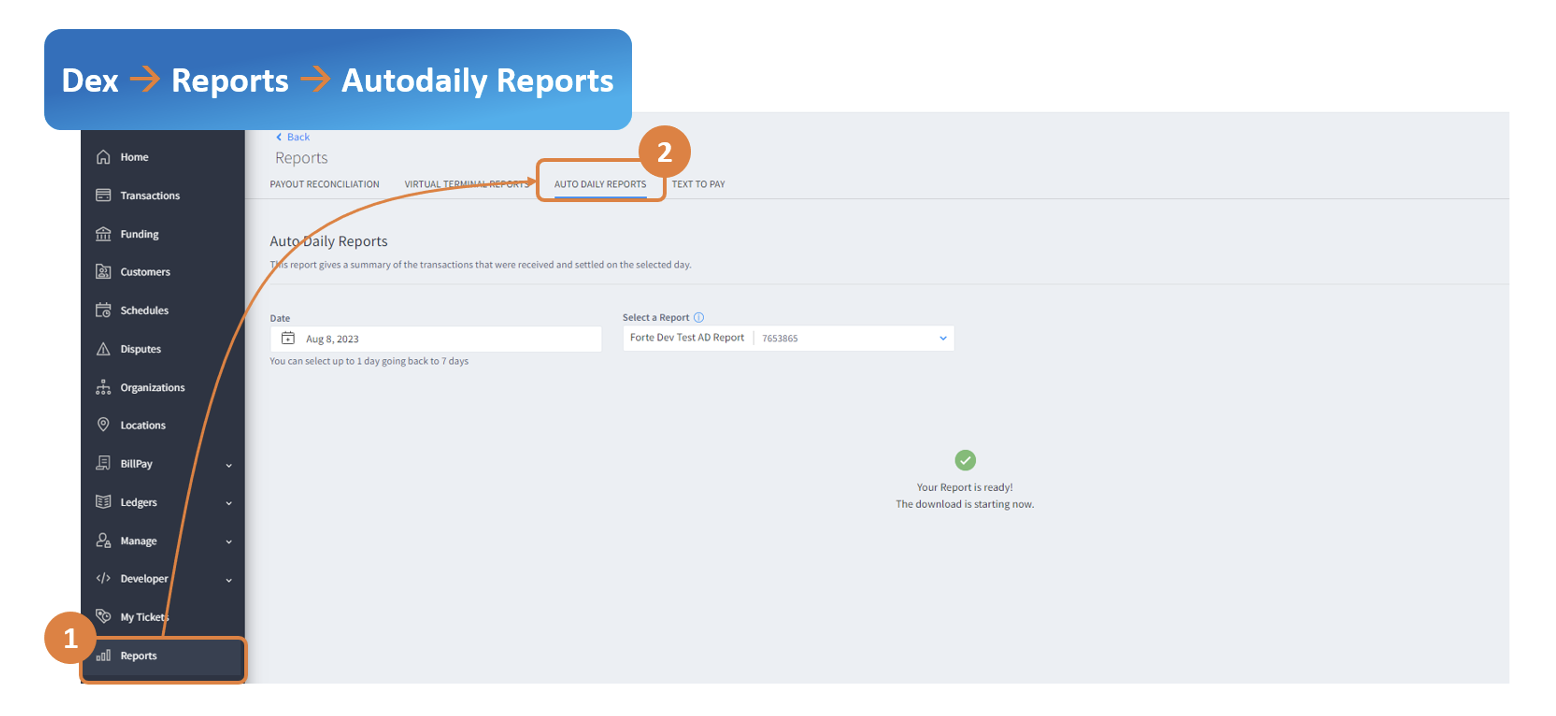
*NEW* Payment Reports
Did you miss a payment report that was emailed to you daily? Now you can download it from dex. Select ‘Auto Daily Report’ from the Dex Reports section.
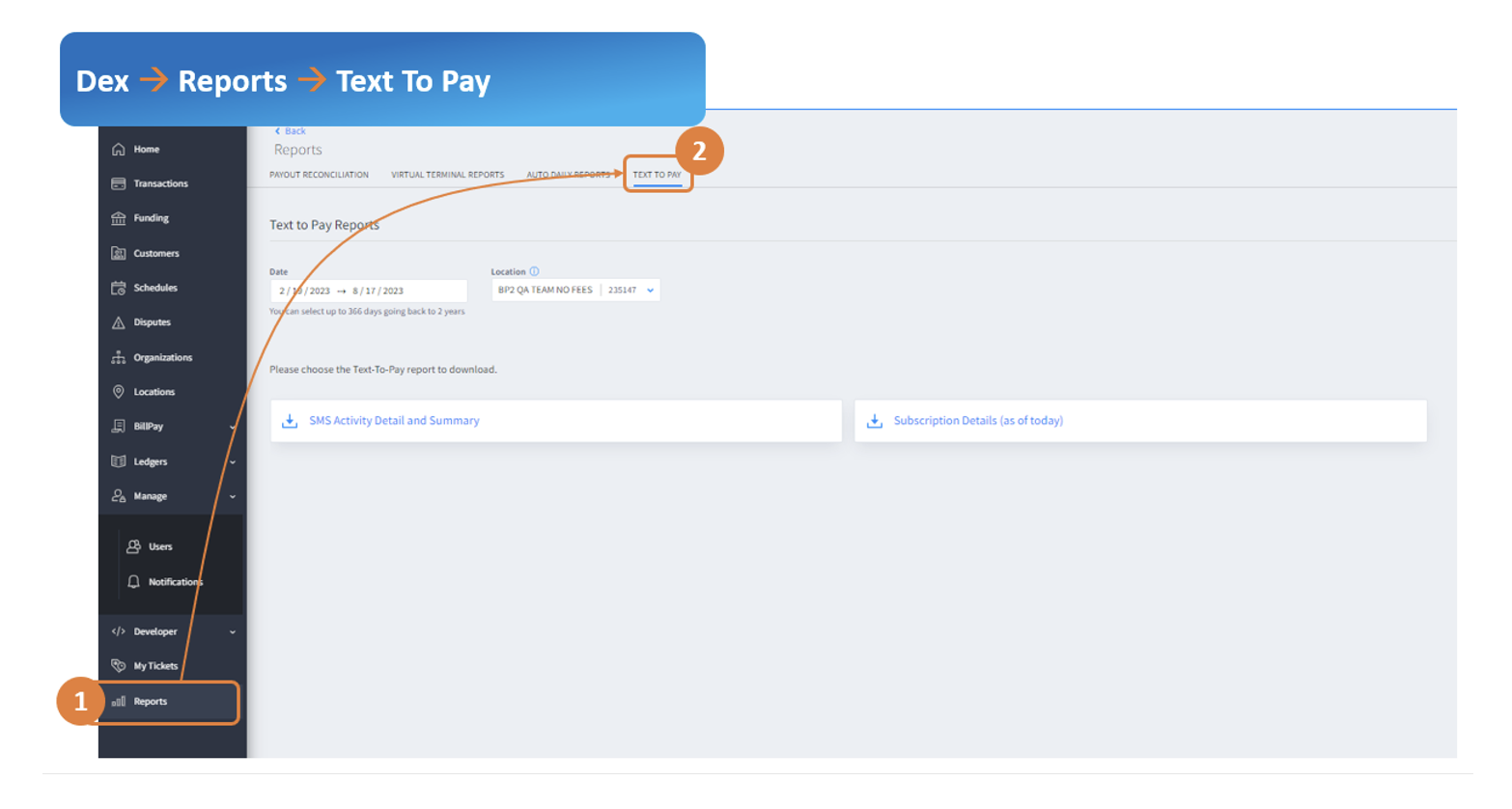
*NEW* Text-To-Pay Reports in Dex
Detailed reporting for Bill payment text reminders is now available in dex. For more information about our text/SMS reminders for Billpay merchants, please reach out to your Account Managers/Sales Rep.
Below are the reports that you will find in this new area in dex:
SMS Activity Detail and Summary – Get details on text message sent and payments received along with the funnel.
Subscription Details (as of today) – List of payors subscribed/unsubscribed for text reminders.
Enhancements
Transaction Download New Field
For eCheck transactions and verify-only transactions, dex users can export the full Routing number in addition to the last 4 account numbers that would help with further analysis
Payment Status Notification
For merchants with more than 15 locations, all locations are now visible in dexà Manage àNotifications to configure payment status notifications to payors via email.
Slightly re-arrange the words to say, ‘Dex Reports Enhancements’ or ‘Enhancements for Dex Reports’
You are currently browsing the archives for the Release Notes category.