Multi Factor Authentication mandatory for new dex users
Posted on
New Feature / Improvements:
Multi-Factor Authentication (MFA) Requirement for New Users
To enhance the security of our merchant accounts, we are introducing a Multi-Factor Authentication (MFA) requirement for all new users registering on Dex. Starting November 5, 2024, new users will need to provide a phone number during registration to receive a verification code, in addition to creating a password.
Here’s how it works: During the registration process, users enter a phone number that will be linked to their profile. For every login, they will receive a verification code via SMS or voice call (based on their preference) to confirm their identity. Users can also choose to save their verification for 24 hours, allowing them to skip this extra step temporarily for easier access.
This improvement adds an extra layer of security, ensuring that only authorized users can access their accounts.
Increase in Account Testing, BIN and Enumeration Attacks
Posted on
The payments industry continues to see an increase in the number of card testing attacks globally. Worldpay advises you and your sub merchants to be diligent, increase awareness and review current detection controls to help prevent these types of fraudulent attacks.
An improved registration flow is now available for your customers in the BillPay Portal.
NEW FEATURE / IMPROVEMENTS:
*IMPROVEMENT* BILLPAY PORTAL REGISTRATION Gets a New Look
We are enhancing the user experience to help your customers with an easier registration process for a new user account.
A mobile-friendly experience.
A cleaner look and feel.
Same functionality.
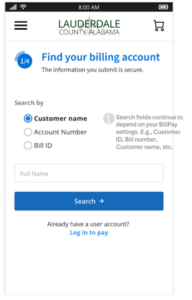
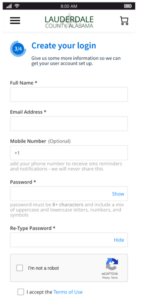
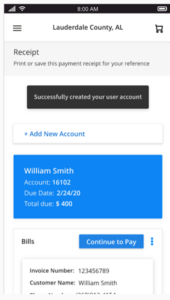
. Enhanced Registration Process Screens:
Search for billing account(s)if you follow the search with optional fields only:
or if you ask for required fields:
Select billing account(s)
Create a user account:
Verify email:
Land on the BillPay portal dashboard:
BillPay account balance notification
Posted on
New Feature / Improvements:
A new email notification is available for your customers to subscribe to in the BillPay Portal.
Let us look into this new feature in detail in the following section.
NEW FEATURE / IMPROVEMENTS:
*NEW* account balance email notification
Registered customers can opt-in to receive email notifications whenever there is an update to their account balance, helping them to stay informed about any changes in their bill amount. This notification is received when an update is made to the account balance.
No default selection is made for the notification, so the user has the option to opt-in to any notification they want to receive.
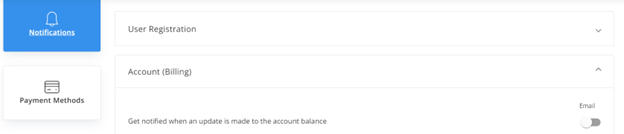
How to enable it? Registered users should log in to their account, go to Settings > Notifications > Account (Billing)
They should turn on the toggle for “Get notified when an update is made to the account balance”.
New notification screenshot:
DEX REPORTS ENHANCEMENTS
Posted on
MERCHANT SERVICES
New Feature / Improvements:
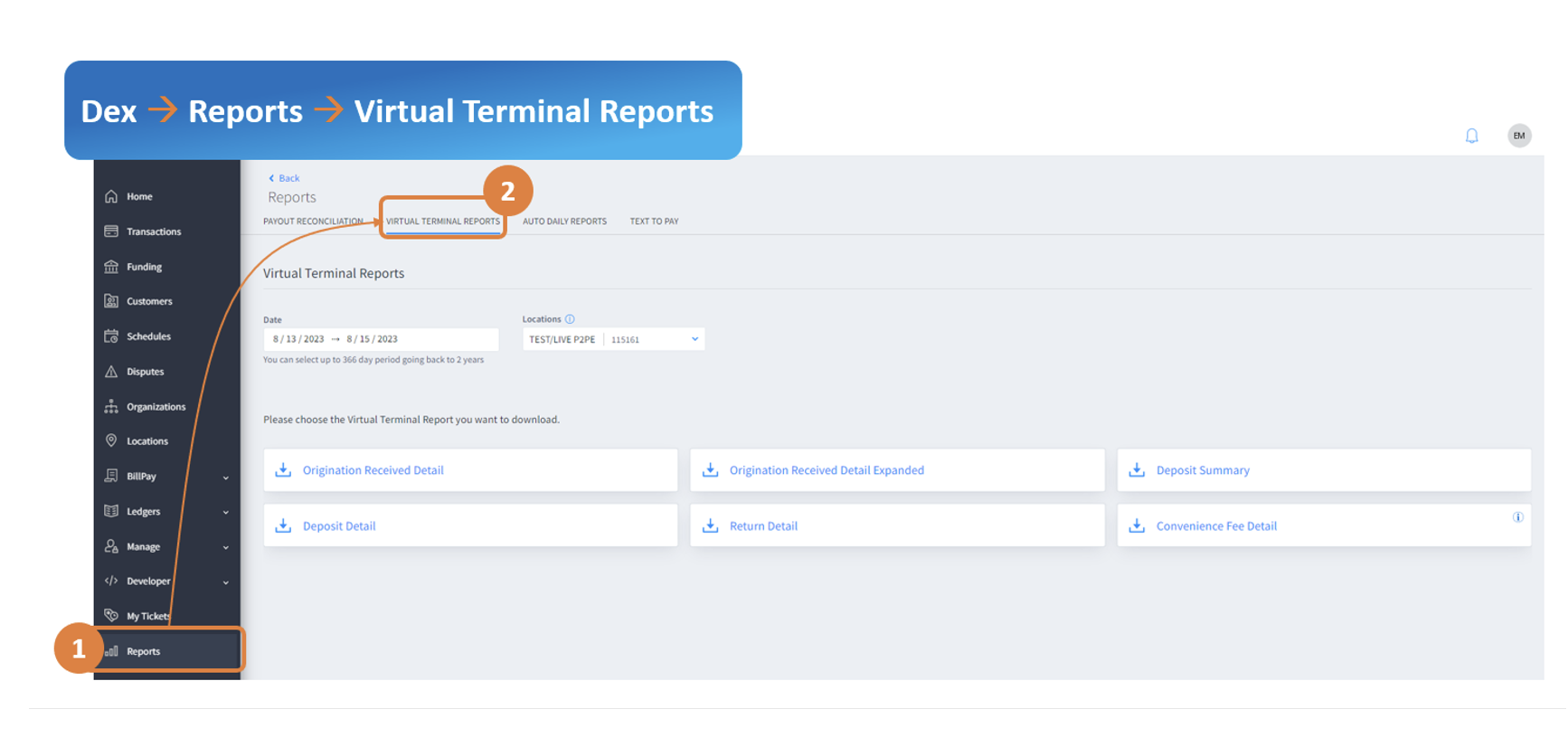
*NEW* Virtual Terminal Reports in Dex
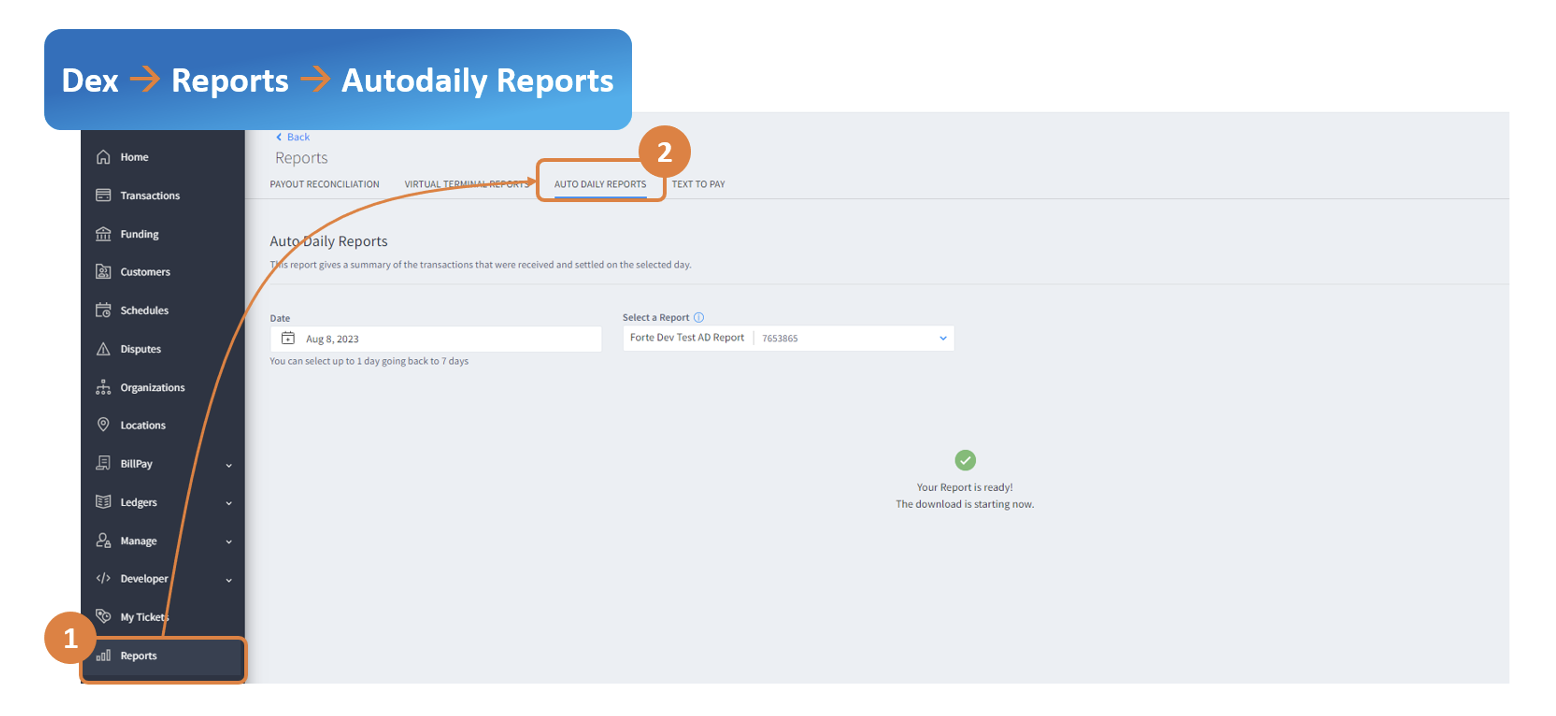
*NEW* Auto Daily Reports in Dex
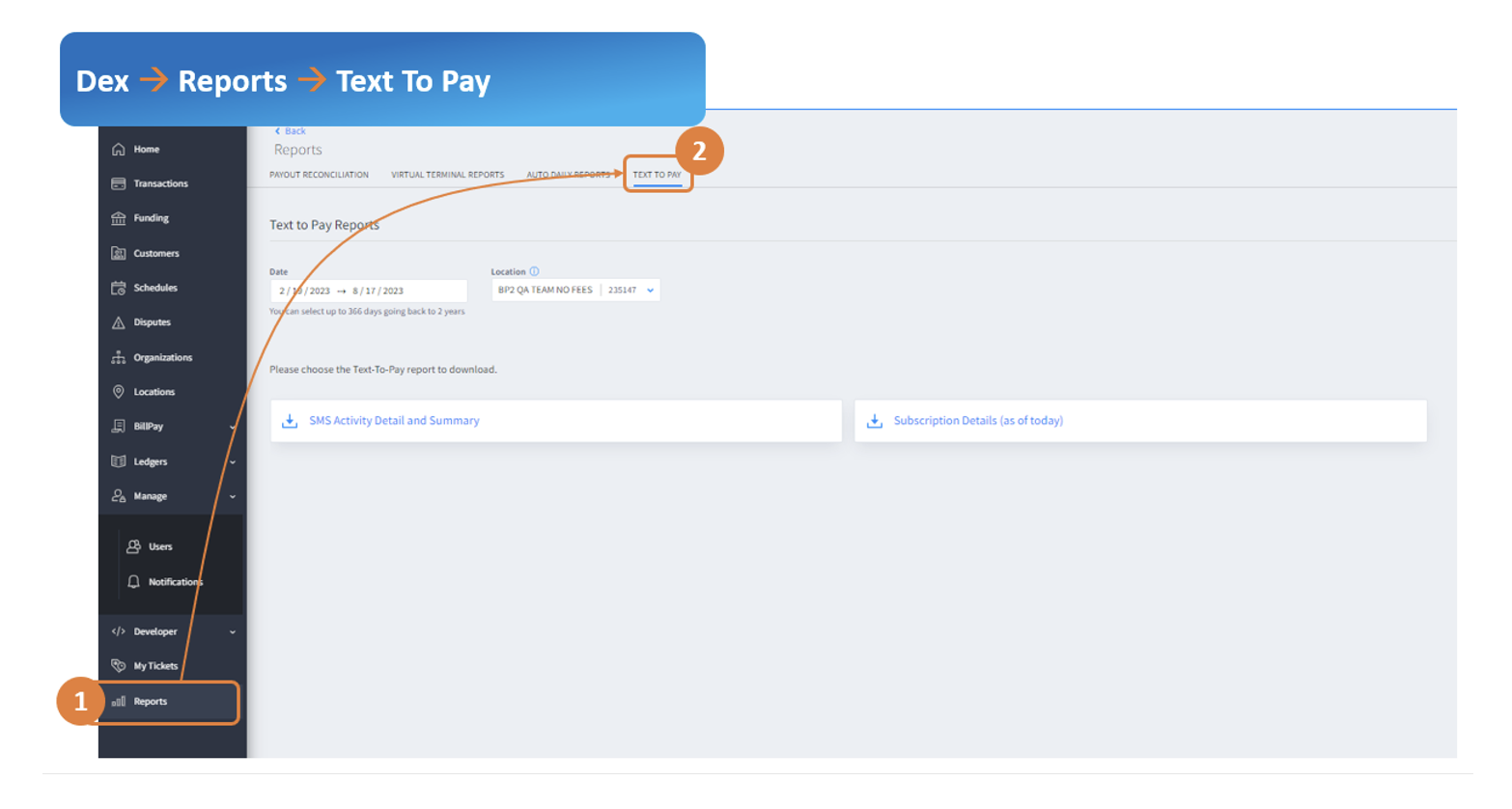
*NEW* Text to Pay Report
Enhancements
Transaction Download New Field: Routing Transit Number
Payment Status Notification: Enhancement to Locations displayed
New Feature / Improvements:
*NEW* Virtual Terminal Reports in Dex
Want to download the Virtual Legacy Reports from Dex? Now, you can easily find them in dex under Reports –> Virtual Terminal Reports tab.
Below are the reports that you will find in this new area in Dex:
Deposit detail
Received detail
Received detail expanded
Convenience Fee detail
Deposit summary
*NEW* Payment Reports
Did you miss a payment report that was emailed to you daily? Now you can download it from dex. Select ‘Auto Daily Report’ from the Dex Reports section.
*NEW* Text-To-Pay Reports in Dex
Detailed reporting for Bill payment text reminders is now available in dex. For more information about our text/SMS reminders for Billpay merchants, please reach out to your Account Managers/Sales Rep.
Below are the reports that you will find in this new area in dex:
SMS Activity Detail and Summary – Get details on text message sent and payments received along with the funnel.
Subscription Details (as of today) – List of payors subscribed/unsubscribed for text reminders.
Enhancements
Transaction Download New Field
For eCheck transactions and verify-only transactions, dex users can export the full Routing number in addition to the last 4 account numbers that would help with further analysis
Payment Status Notification
For merchants with more than 15 locations, all locations are now visible in dexà Manage àNotifications to configure payment status notifications to payors via email.
Slightly re-arrange the words to say, ‘Dex Reports Enhancements’ or ‘Enhancements for Dex Reports’
Transactions, Notifications, and Schedules Improvements in Dex
Posted on
MERCHANT SERVICES
New Feature / Improvements:
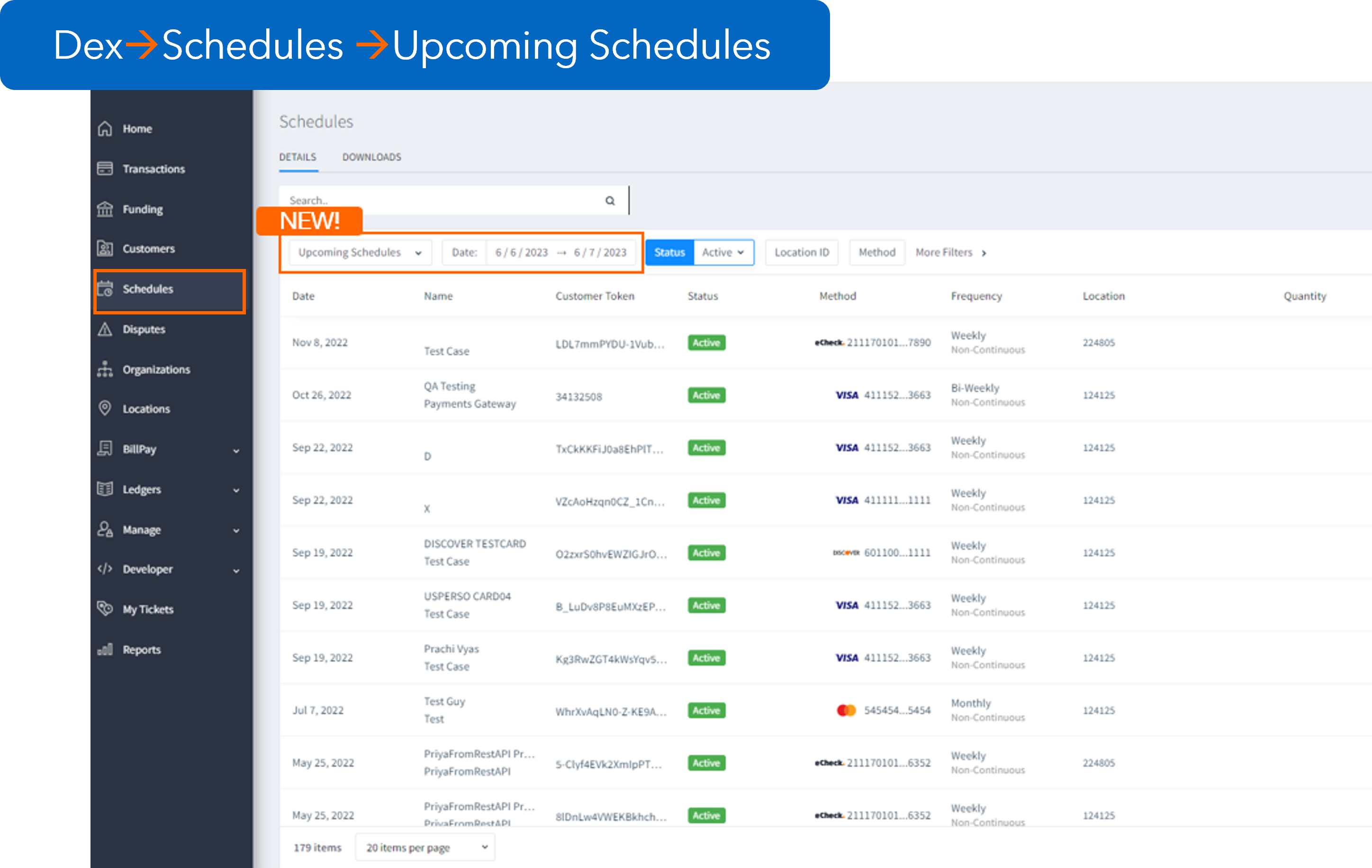
*NEW* View by Upcoming Schedules
*NEW* Additional Fields in Adding Schedules
*NEW* Summary in Transaction Download
*NEW* Wallet Payments in Dex
Enhancements
Updates to Payment Status Notifications
New fields in
Transaction Receipts
Maximum allowed templates enhancements in Transaction Download
Response type in Transaction Details
Freshdesk Requests
Bugs Fixes
Team:
Dexiles
Product:
Dex Dexiles R1.71 (06/06/2023)
New Feature / Improvements:
*NEW* View by Upcoming Schedules
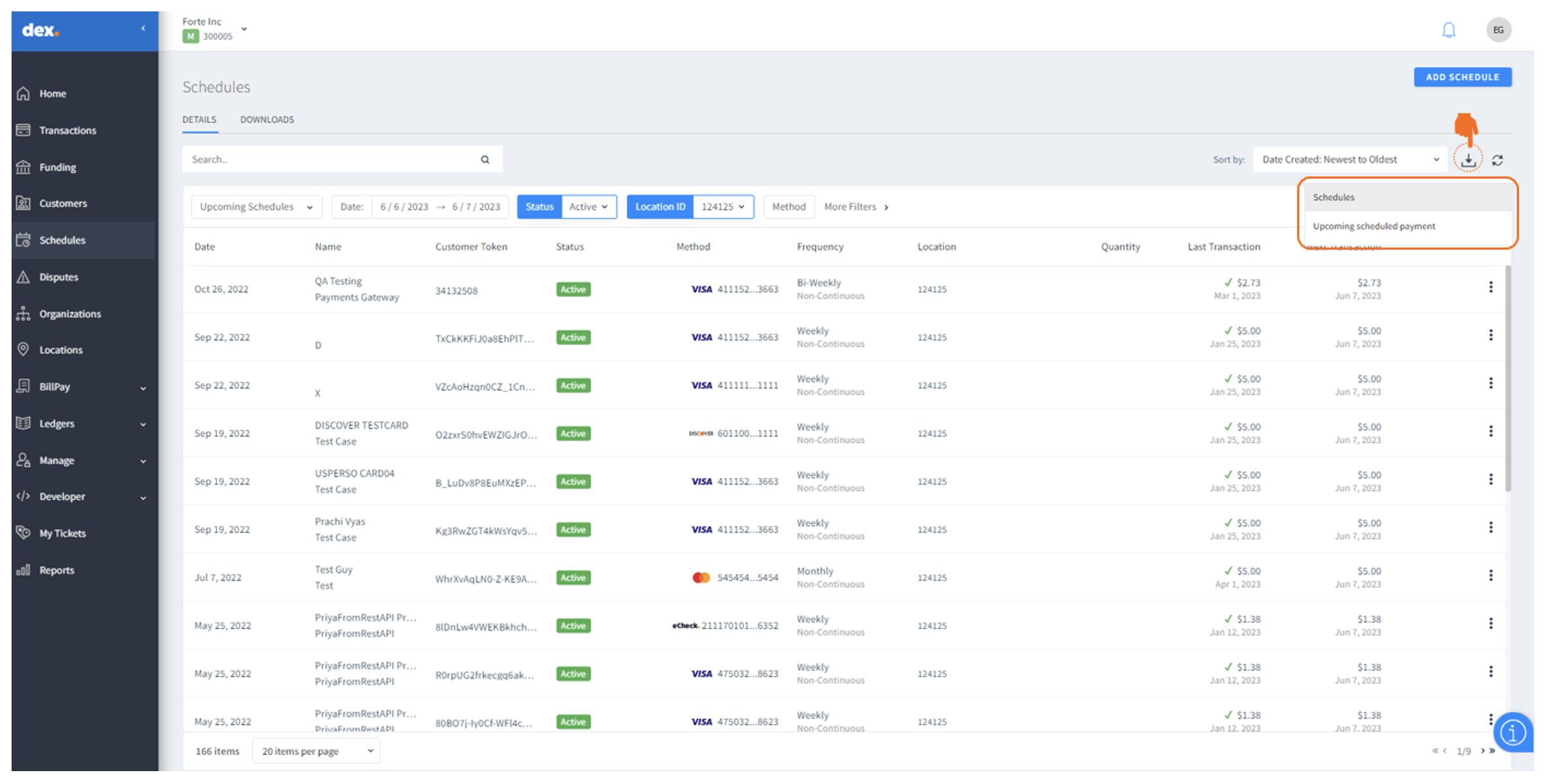
Want to see the upcoming schedules? You can easily do it by clicking in the ‘Schedules’ section of Dex.
Select ‘View by upcoming schedule’ in Schedules and select up to 15 days in future.
*NEW* New Fields in Schedules Download
You can now download the upcoming schedules data or the upcoming payments data by clicking in the Download arrow in the ‘Schedules’ section of Dex.
The fields on the download depend on the type of download you select, there are new fields included in the download to improve the track and reporting:
Fields in Schedules:
Date Created, Company Name, First Name, Last Name, Customer Token, Status, Method, Account Type, Frequency, Schedule Type, Location Id, Location Name, Next Transaction, Next Transaction Amount, Schedule Id, Consumer ID, Consumer Order ID, Wallet ID, Card Expiration Date, Quantity, Last Transaction, Last Transaction Amount
Fields in Upcoming schedules payment:
Date Created, Company Name, First Name, Last Name, Customer Token, Status, Method, Account Type, Frequency, Schedule Type, Location Id, Location Name, Next Transaction, Next Transaction Amount, Schedule Id, Consumer ID, Consumer Order ID, Wallet ID, Card Expiration Date, Debit or Credit, Entered By
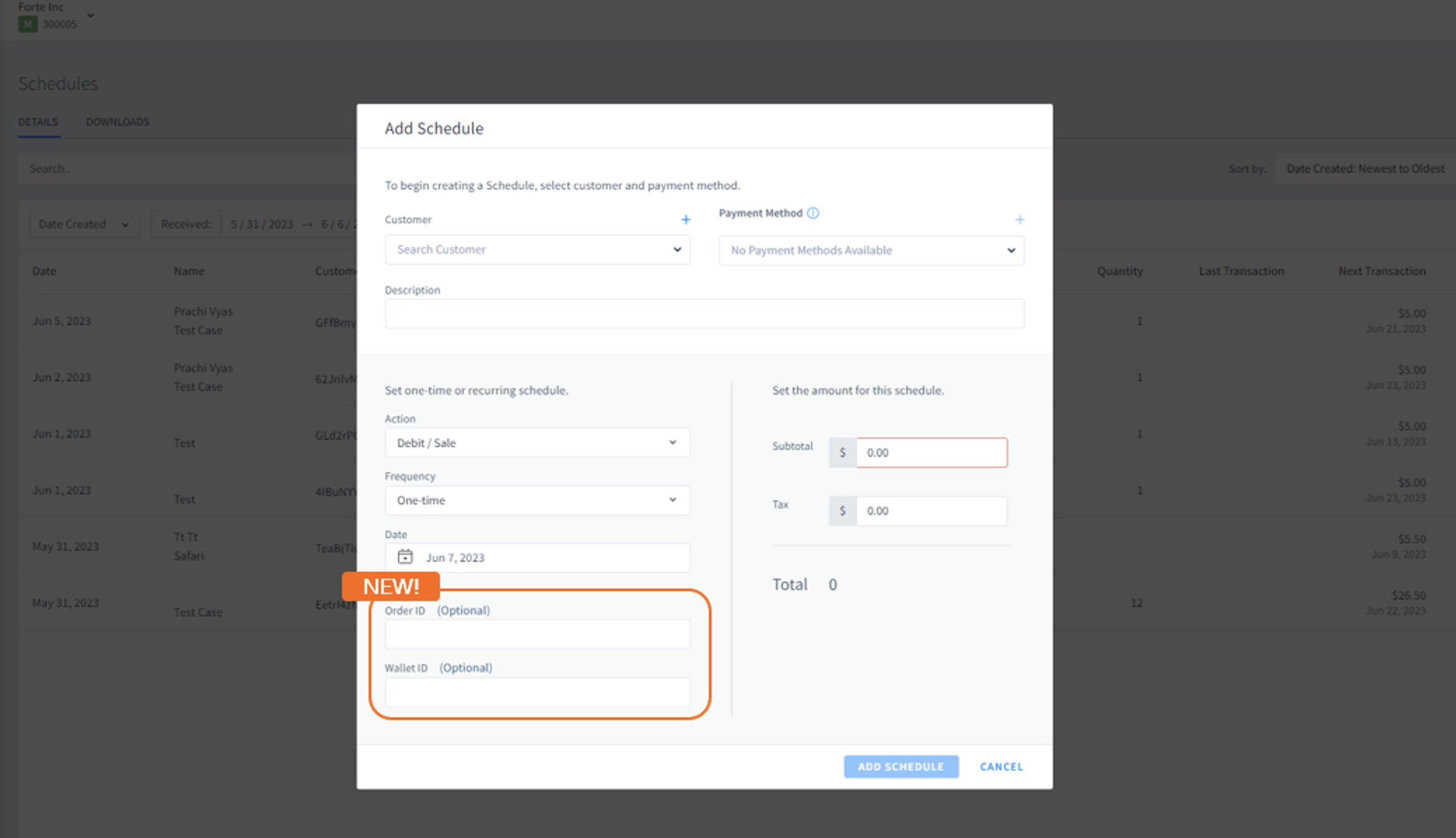
*NEW* Additional Fields in Adding Schedules
You can now add custom info in Order ID and Wallet ID to scheduled transactions. This will be visible in the future transaction download for easy reporting and tracking.
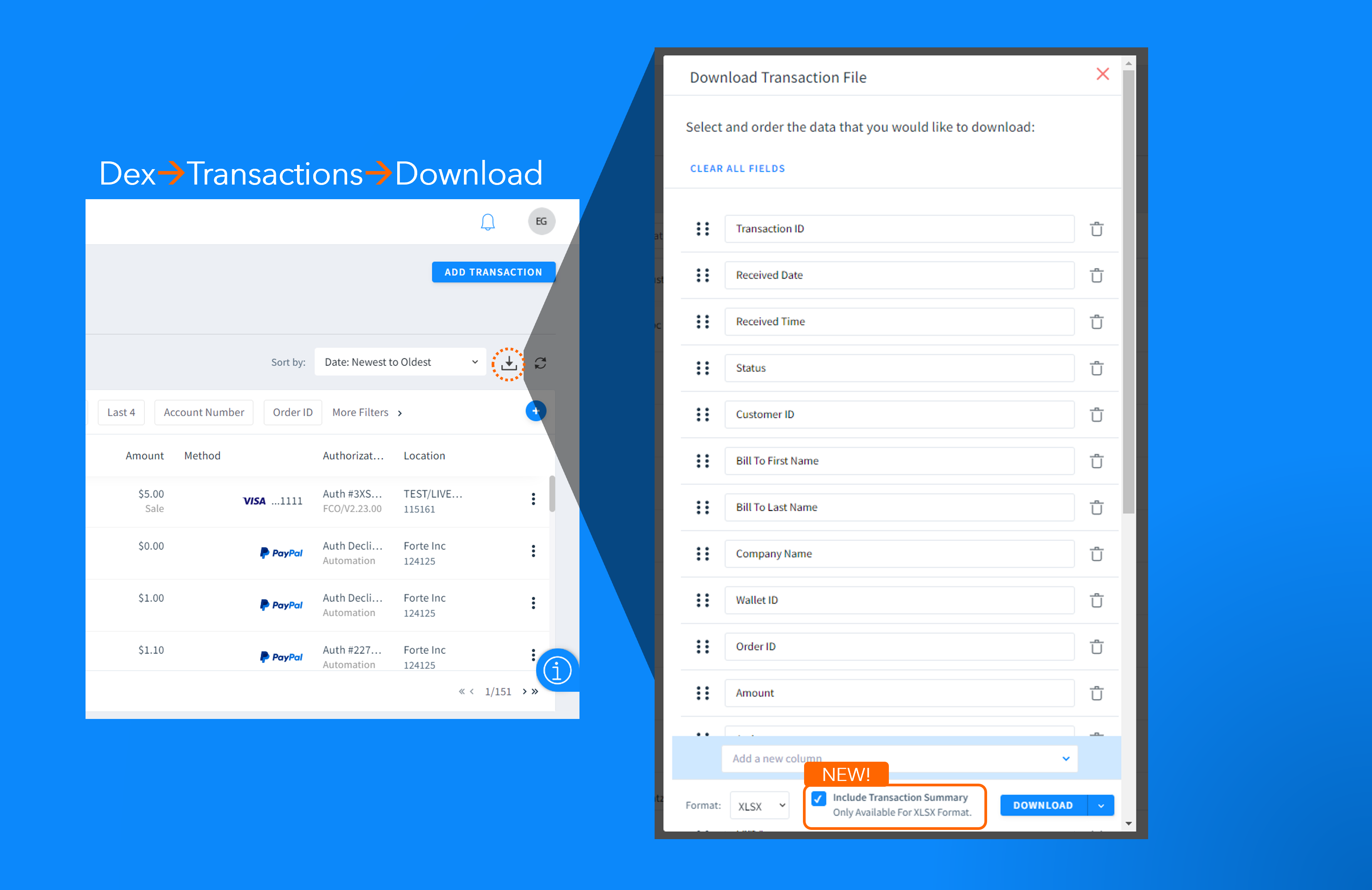
*NEW* Summary in Transaction Download
Want to quickly grasp the transaction data? Include summary info along with the detailed transaction when you download transaction data from Dex. The summary tab summarizes the data in the file in an easy to read format and eliminates the user having to manually summarize the data in the file.
Simply select ‘Include Summary’ when you download the transaction data. This is available only in .xlsx format.
*NEW* Wallet Payments in Dex
Dex now supports Wallet Payments. Users can easily find a payment made with using the A new filter, ‘Wallets’ in the Transaction Datagrid. has been added to “More Filters” on the transaction datagrid. This new feature allows users to quickly filter on Apple Pay and Google Pay transactions.
To make it quicker to identify if a transaction was created using a digital wallet, Apple Pay and Google Pay logos have been added to the payment status notifications and to the payment status notification receipts that can be attached to the notifications.
The Google Pay logo has been added to the Dex transactions receipts in support of the Google Pay release. Merchants enabled for Google Pay will see the logo on receipts from Dex.
Transaction Receipts in Dex and in customer notification will show Google Pay and Apple Pay logo for you and your customer to identify a transaction as a wallet transaction.
Enhancements
Updates to Payment Status Notifications
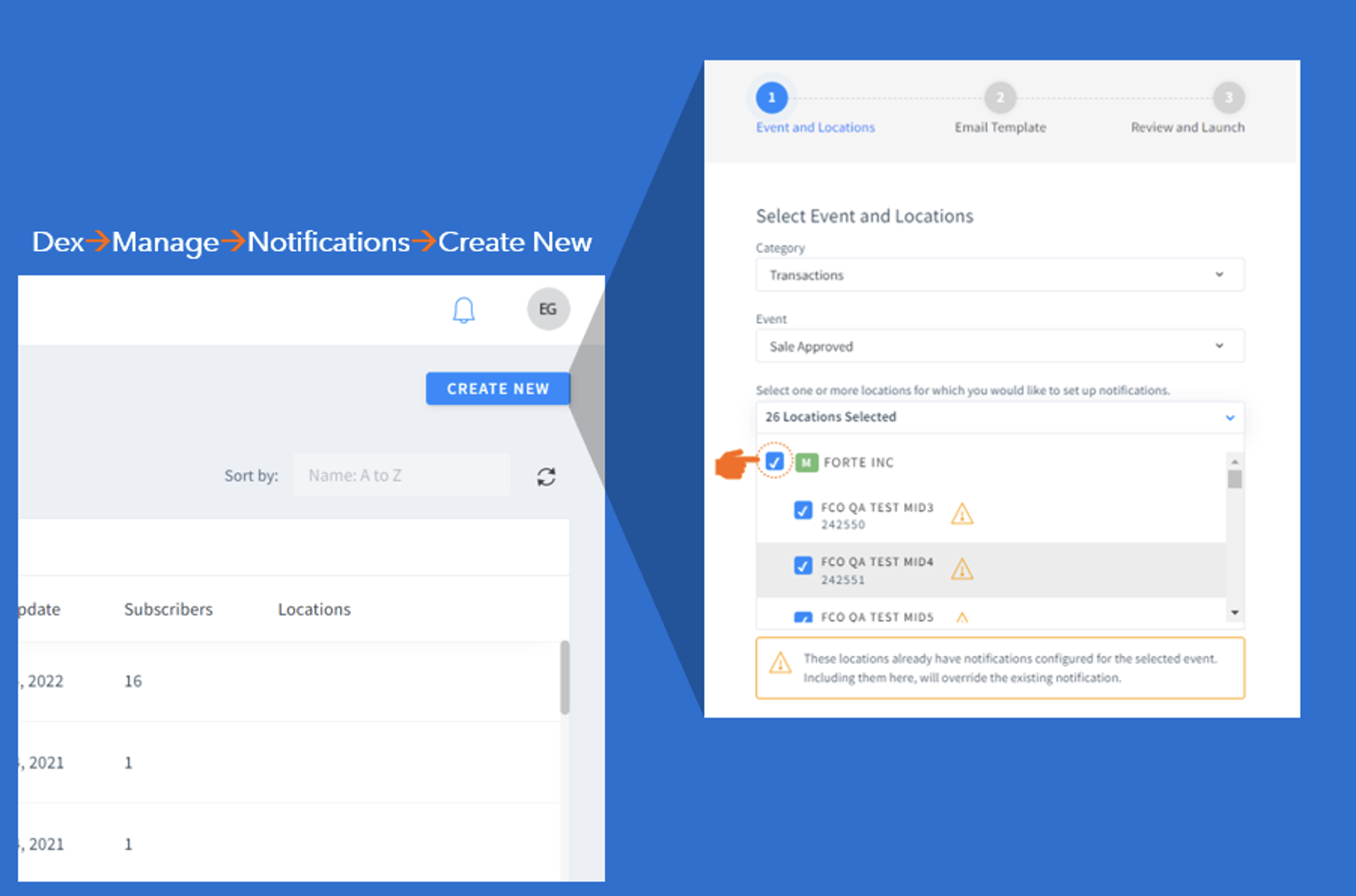
Trying to create a notification for all Locations? We’ve made it easy to select/unselect all locations with a single click.
Users can now immediately see the logo that they uploaded to be included in the notification.
New fields in Transactions Receipts
New informative fields have been added to receipts to make finding bill to and ship to email addresses and phone numbers easier. The Bill to email address, Bill to phone number, Ship to email address and Ship to phone number have been added to the Receipt tab and the Detailed print receipt in Dex.
Maximum allowed templates enhancements in Transaction Download
Updates to the transaction datagrid download feature make for a better user experience when saving templates and downloading data. Download messaging improvements warn the user when the maximum allowable number of templates have been saved so that the user is aware that if they wish to save another template, they must delete one of the existing templates.
Response type in Transaction Details
Response Type has been added to the Bank Account Owner Verification – Authenticate Transaction Detail screen. The response type will display the match response.
Freshdesk Requests
Void and Declines Transactions removed from the total in the Autodaily report.
The received items summary tab in the Autodaily reports included the void and decline totals in the Received Items-All Methods and CC Methods Tallies columns and were included in the sub-totals and grand totals making it difficult for the merchant to balance to the report. To resolve this issue, the decline and void totals have been removed from these columns in the reports.
Editing the wording “+ Charges may apply” in the custom payment status notification.
At the request of merchants, the wording “+ Charges may apply” has been added to the Schedule Created notification template. This wording can be removed from the template when creating or editing the template. Templates created prior to releasing this improvement will not contain the new wording.[CK3] [EM4]
Reminder Email for disputes in status “Documents Needed.”
Merchants reported that they were missing the step to set the dispute to Submit for Review after submitting dispute documents, causing the merchant to lose disputes. A disputes reminder has been created to remind the merchant of the dispute process if it remains in a Documents Needed status for 5 days and again at 9 days.
Permissions for displaying the performance dashboard in the Home Page
Many merchants have expressed concern over their employees having access to the performance charts on the organization home page in dex. A new permission (Dashboard|View Dashboard) has been created to control a users ability to view the organization homepage charts. All users currently have the permission to view the performance charts on their organizations homepage. Merchants that want to remove access to the performance charts should create a Freshdesk ticket to request a custom role.
When a user status is changed from suspended to deleted, Dex was not removing the user id from the standard notifications distribution list. The user continued to receive the notifications even though their user id status had been set to deleted. Dex will now remove the username from the notifications list when a user id status is set to “Deleted” so that email notifications will no longer be sent to the deleted users email address.
Payment Status Notifications
Users are now able to click the cross on the drag and drop fields to remove the field from the notifications thus eliminating the need to drag it out of the notification.
Eliminated the break when manually adding email addresses to custom notifications.
Active File Delivery
Using the up and down arrows to move the order of the fields during the AFD report set-up no longer results in the previous field being copied.
Reverse Amount
The issue with the reverse transaction modal not saving the correct reversal amount has been addressed with this release. The reversal amount is being saved correctly.
We are excited to announce that Application status notifications are now available for all your merchant applications.
From Submitted to Pending to Enrolled, you and your merchants can get notified instantly as the application rolls through different stages. We’ve even added notification to let you know when one of our Risk Analyst adds a note/comment in your merchant application. And to make it personalized, your logo can be included in the notification.
Enabling the notification lets you and your merchant stay on top of the application approval process and allows you/your merchant to respond quickly for any additional information requested by Forte.
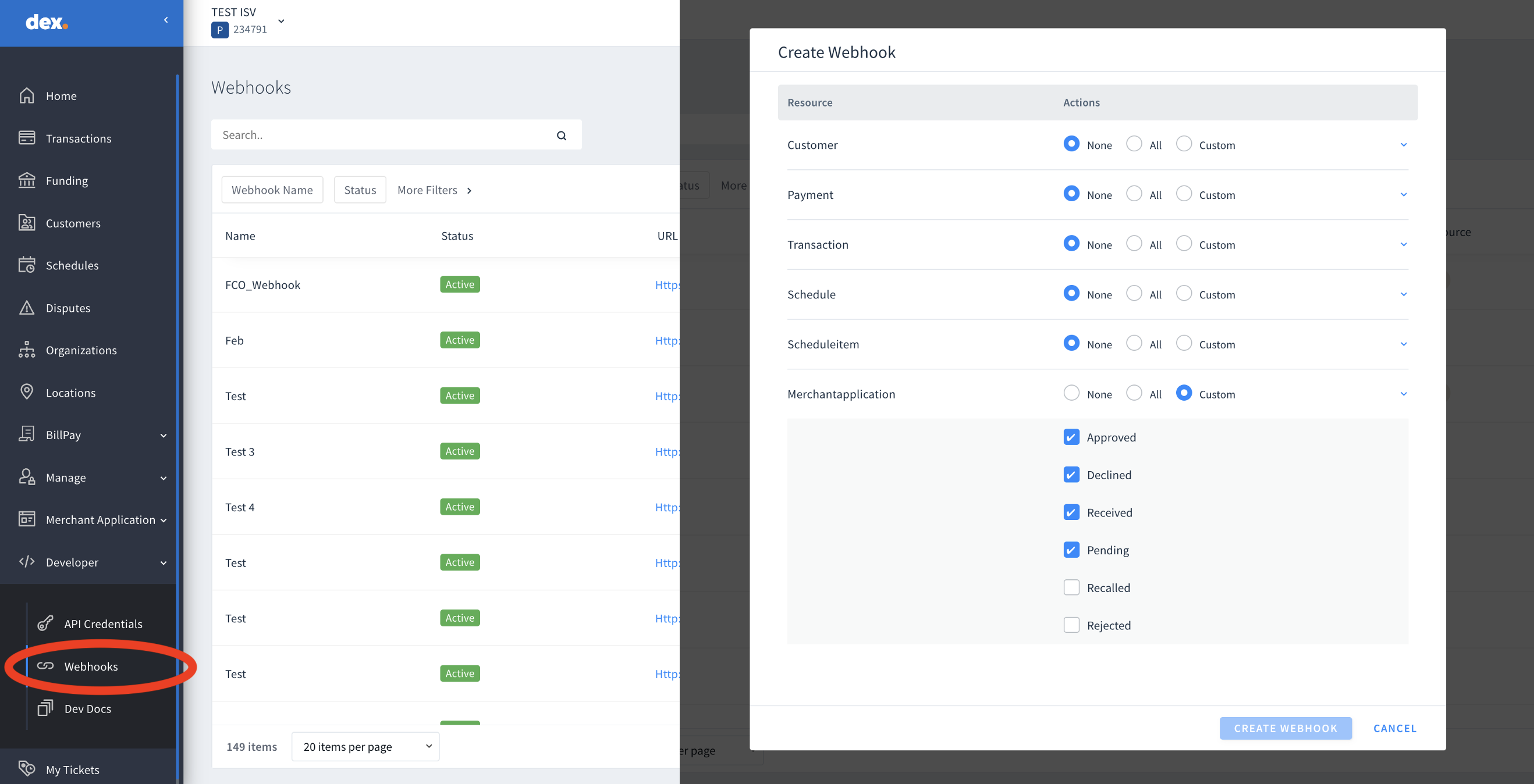
Notifications are available for the following statuses:
Submitted
Approved
Declined
Enrolled
Pending
Recalled, and
Rejected.
Just reach out to your Account Manager to turn ON application notifications for your portfolios. Make sure to let your AM know who to send the notification to and to include your logo.
*NEW* Application Status Notification Webhooks
Webhooks are now available to receive notification on the different application statuses.
Configuring a webhook to receive notifications will allow your Web/mobile Applications to instantly notify your merchants on the status of the merchant application.
Login to your dex account and go to Developers/Webhooks to add new Webhook for application notification.
Enhancements
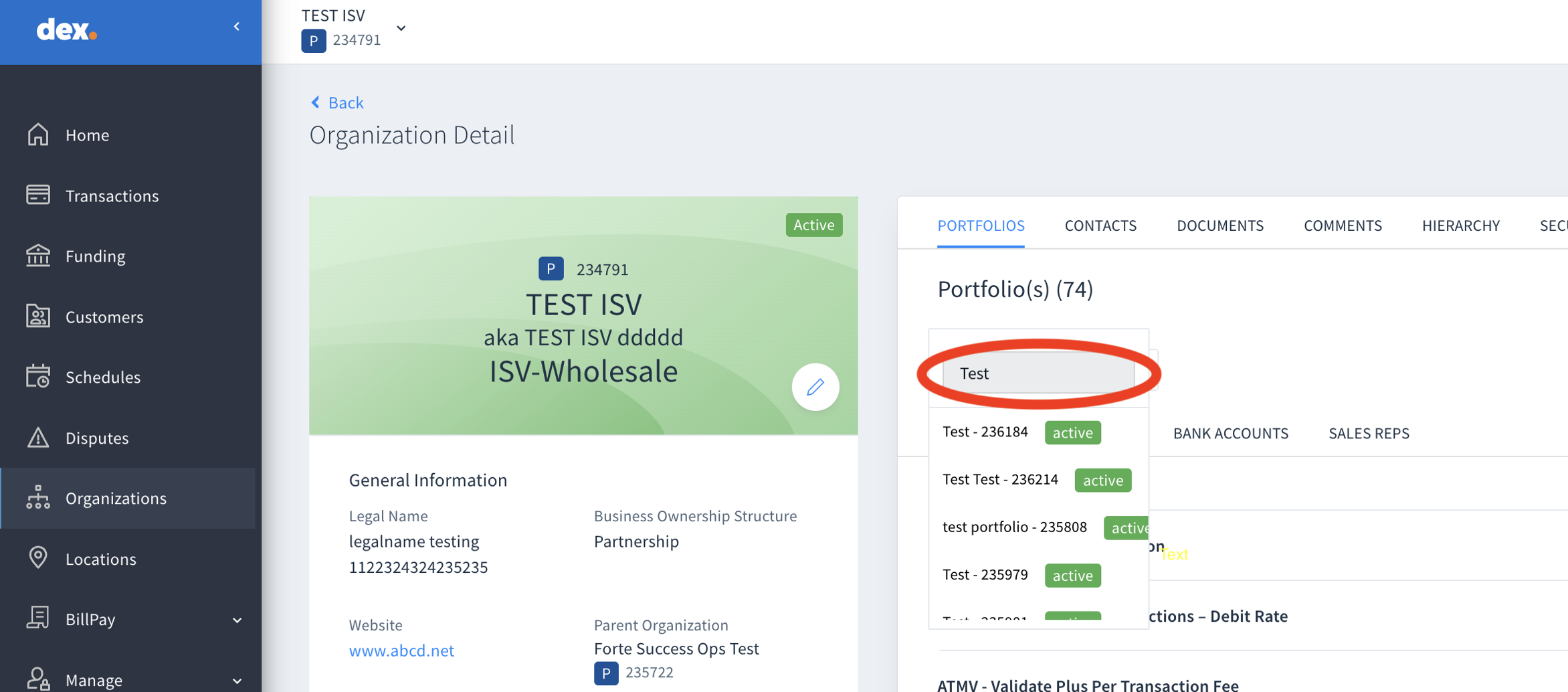
Search a Portfolio by Name
We’ve made it easier to find your portfolio by name in the organization details screen. Simply search by name in the Organizational detail screen/Portfolios Tab and pick and choose the one that matches to see your Buy Rates, Rate Plans, Sales rep and more. This was requested via FD744779
Bugs
Users who previously were not able to submit applications with the word “box” in the street name are now able to submit the application.
Users applying numerous filters to a datagrid was causing the datagrid to crash with no explanation to the user as to why, leading to an unacceptable user experience. When the filters applied to the MSA, Rate Plans or Payfac datagrids reach the maximum limit of 2048 characters, a new warning message will advise the user to reduce the number of filters applied to the datagrid.
Transactions, Improvements to Data Grid and Apple Pay
Posted on
Dex Release 1.70.1
Benefits to Customers:
Merchants and partners will benefit from new improvements in the transactions download section, such as the ability to save the default template at any time, new filters added to the Dex platform, new flags for non-sufficient funds added to the verification services section, and the ability for merchants to request the new payment method Apple Pay from the enrollment team.
Current Behavior:
Previously, the transactions download section did not allow users to save templates without applying changes to the default template. In addition, the final user couldn’t filter by location (MID) in the transaction grid, and to filter by order ID, the merchant had to access the more filters section. Also, although Forte Checkout had launched its new payment digital wallet solution, Apple Pay, it was not yet enabled for Dex users. Before this release, there were only two non-sufficient flags, but this release adds four new flags.
New Features/Improvements:
Transaction Data Grid – Customized Downloads:
Users can now download and save the default template at any time during the download and export process.
When using a previously saved template, users can download and save the template or save it as a new template during the download and export process.
Added three new fields to the default list on the Download Transaction Modal when the user is at the Merchant Level: Bank Account Verification, Principal, and Service Fee.
Transaction Data Grid – Updates:
Added a new Location Filter on the Transaction Data Grid, enabling users to filter transactions on one or more locations.
By default, at the Merchant level, the location filter will display the first 10 Locations in a dropdown list for the user to select. If there are more than 10 locations under the Merchant Organization, users can search for additional locations using the search function in the location filter modal.
Partners and employees can search for one or multiple locations using the search bar within the filter.
Moved the Order ID filter from “More Filters” to a selection on the data grid filter line.
Transaction Receipt – Updates:
Updated the disclosure information on eCheck credit transaction receipts.
Updated references to CSG Forte to CSG Forte Payments, Inc. in targeted areas.
Updated the NMLS ID from 986669 to 1986669.
Digital Wallet: New Section: Alternative Methods of Payments:
This section can be used to verify if the merchant location has any Digital Wallets enabled.
When enabled, the section will show as “Active” and display the logo(s) of the digital wallet types that are enabled for the merchant.
Added Wallet Type in the sandbox prod environment.
Verification Services – Validate Plus Changes:
Validate Plus – Reused existing flags for NSF fee.
The existing NSF (non-sufficient funds) flags have been modified to have four new flags based on the account age and overdrawn status.
These updates provide Dex users with a better experience using the platform, with enhanced functionality and improvements in performance. If you have any questions or feedback, please don’t hesitate to contact our support team.
FORTE CHECKOUT | RELEASE NOTES NEW FEATURES/IMPROVEMENTS
Posted on
RELEASE DATE: MARCH 15, 2023
DEVICES V400C
Merchants using Forte Checkout with the V400c Plus terminal, can now benefit from enhanced coordinating controls.
The inclusion of a new button parameter on Forte Checkouts code will allow the Forte Checkout modal to close after completing a transaction on the V400C Device, and:
Inform the users when the transaction is completed,
Provide the correct response in the callback (approved / declined) and
Generate webhook if it has been set up.
To read more visit our Developer Documentation for Forte Checkout, here, on the parameter:
hybrid_close_modal.
FIXES/CORRECTIONS
· Cancelling from checkout.js does not cancel on the v400c EMV device and vice-versa: CSG Forte Payments (FD 722024)
Dex 1.70 Release Notes
Posted on
RELEASE DATE: February 16th, 2023
Transactions
Transactions download – Save Customized fields as template
Users will have the ability to download the chosen set of fields and save those as a template.
Saved templates can be used in future downloads
A maximum of 10 templates can be saved
Transaction download – File Formats
Users will have the ability to choose between CSV and XLSX as file formats when exporting transaction data from dex.
In the transaction export file, following fields for Refund / Credit / Unfunded transactions will be represented as a negative value:
Amount – E.g. -$10.00
Principal – E.g. -$1.00
Service fee – E.g. -$1.40
Tax Amount – E.g. -$2.00
In the transaction export file, following fields for Void transaction will have zero dollars.
Amount – E.g. $0.00
Principal – E.g., $0.00
Service fee – E.g., $0.00
Tax Amount – E.g., $0.00
The ‘CVV Result’ will be mapped to display the same info that the user sees in the transaction detail screen.
Transactions Grid – Updates
For transactions created using Apple Pay wallet, an Apple Pay logo will be displayed in the Method column in the transaction grid.
Tooltip for transactions in Settling status: a new tooltip was added to notify the user that is not possible to take any action on a transaction when the transaction status is ‘Settling’.
·Added P95 (Bad Account) to the Bank Account Verification filter.
Add Transactions – Update for Bank Account Owner Verification
If user adds a new Bank Account Owner Verification type transaction, Account type field is now optional.
Replaced N/A with Verify in the Amount column for Authenticate transactions.
Transaction Receipts – Updates
Updated the CSG Forte address in the licensed money transmitter section to: 2121 Providence Dr, Suite 151, Fort Worth, TX 76106
Updated the CSG Forte address in the California Resident Right to Refund section to: 2121 Providence Dr, Suite 151, Fort Worth, TX 76106
Disputes:
Dispute Detail – Updates
Dispute action “Accept” was updated to “Accept Chargeback” on the Action Dropdown in the Dispute Detail page.
Notifications:
Payment Status Notification – Updates
Updated the formatting in Payment Status Notification and receipts, so that keywords and customer data will be capitalized where necessary.
Partner Organization
Partner Organization Detail:
Added the display name to the Partner Organization Detail card.
Order on the card is:
Display Name
DBA Name
Partner Type
Users with edit permissions can update the display name.
Merchant Application:
The “Services” filter on the Merchant Application data grid has been updated:
Account Updater, Bill Pay and IVR have been added to the list of services
Each service is listed separately as an option to select
Selecting one or more services will return all applications that contain one or more of the services selected in the filter
Application Status Notifications
Application Status Notifications will be available at the Partner Org level in Dex to enable automatic notifications for merchant application status changes.
Resend Notifications:
Enabled the ability to resend the application status notifications by clicking on Actions>Resend eMail Notification from the Applications Detail screen.
Selecting resend eMail Notification will trigger an application status notification to be sent for the current status of the application to the recipient’s set-up in the notification template.
Webhooks
Enabled the ability to create Merchant Application status webhooks at the Partner Org level for the following application statuses:
Approved
Declined
Pending
Recalled
Rejected
Submitted
Freshdesk Tickets
FD 807427 – Users with smaller screens are reporting that number values are truncating on Dex screens.
When a user accesses any screen in Dex that contains dollar/number values, the screen will resize the field so that the full amount is visible to the user.
Bill Pay 2.0 | Release Notes
Posted on
New Features/Improvements
Custom scheduled payments
Released the ability to set up a custom scheduled payment in the BillPay Portal.
When scheduling a payment in the BillPay Portal, customers will have the “custom” schedule type available.
Customers should select the payment method, enter the number of desired payments, select the schedule type as “Custom”, the start date, and the payment amount. Once that information is selected, the payment plan will be displayed.
Customers will be able to modify dates and amounts in the payment plan. The payment amount does not have to be the same, that will depend on the customers’ preference.
Custom schedules should be enabled in dex at the Location level, and within the BillPay tab > Payments and Billing Model > Scheduling > Multiple payments > Custom.
The number of custom payments must be equal or greater than 2, and the maximum number of payments to enable is 24.
BillPay Portal Timeout implementation
Released a session timeout in the BillPay Portal to prevent payments outside of merchant Portal activity windows.
If portal is suspended, user should not be able to perform any activities.
When the user is inactive in BillPay Portal, user will be redirected to home page after 15 mins.
With 15 minutes of inactivity, Portal will display the first session timeout warning screen with two buttons: End session and Get more time.
End session will end the session and redirect the user to home page. And Get more time will get additional time.
If the user does not respond to the first warning screen within 1 minute. After a minute, Portal will display a timeout session window with a single button (ok button) that will take the user to the BillPay Portal home page.
Mobile-friendly cart
Released an improvement to make the cart and the payment center fit better on mobile devices.
Mobile-friendly checkout
Released an improvement to resize the checkout window to properly fit in mobile devices.
Fixes/Corrections
Freshdesk ticket #745984 – Grouping bill
Released fix that will require customers to pay the oldest bills, before the most recent ones in the BillPay Portal in the grouping selection.
A pop-up window will be shown to the customers to communicate that there are older bill item(s) which must be paid in full, before most recent bills can be paid.
Freshdesk ticket #766847 – Future date payments
Released fix that will remove some bills from customers’ cart if the bill presents any update. That will prevent customers from paying bills with a future presentation date.
An alert will be displayed to the customer to indicate that some items have been removed from cart due to bill updates or if payment has already been made.
Scheduled payments login
In some scenarios, customers were unexpectedly logged off from BillPay Portal when trying to schedule a payment. Fix was made.
Kiosk mode non-registration
Released fix to ensure users are unable to register when kiosk mode is enabled.
BillPay shopping cart removed bills
Released fix to stop some bills from being removed from the cart when landing/refreshing the BillPay Portal and Payment Center.
Checkout fixes
Released fix to prevent the scroll down from overlapping text in checkout window for some devices.
Released fix to stop buttons from overlapping In BillPay checkout screen for some specific devices.
You are currently browsing the archives for the New Features category.